Basic version of SureFox
SureFox Pro version has been released with the following new features:
- Lock down Android Tablets and Smartphones to run SureFox in kiosk mode
- Prevent and block launch of 3rd party applications from SureFox
- Suppress system messages and notifications
- Allow applications present on custom toolbar
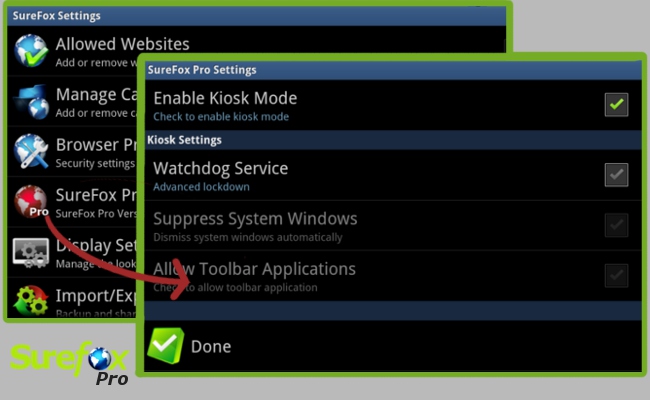
1. Access SureFox Admin Settings
2. Tap on SureFox Pro Settings
3. Check Enable Kiosk Mode to run SureFox in kiosk mode
4. Enable Watchdog Service to block launch of 3rd party applications
5. Enable Suppress System Windows to dismiss system dialogs and notifications
6. Enable Allow Toolbar Applications to automatically allow applications present on SureFox custom toolbar
7. Tap on Done to go back to SureFox Settings and follow on screen steps to enable SureFox as default homescreen
8. Your SureFox