| Applies to: | |
| Product | SureMDM |
| Platform | All |
1. Login to SureMDM Web Console
2. Go to Reports > On Demand Reports and select App Version.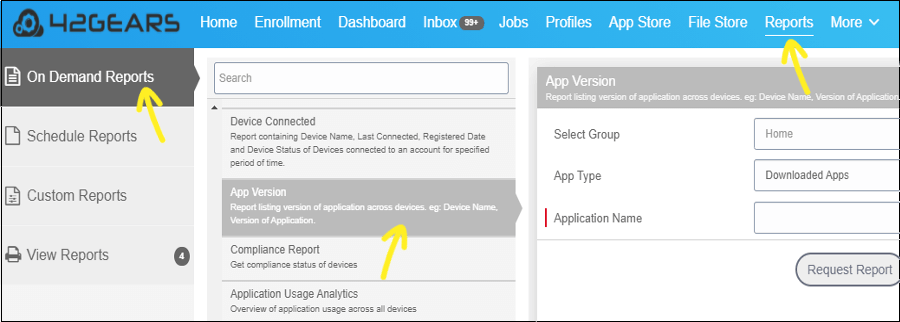
App Version section,
- Select Group - Browse and select a group
- App Type - Choose an app type (All Apps/System Apps/Downloaded Apps) from the drop-down list
- Application Name - Type the name of the application in the Application Name field
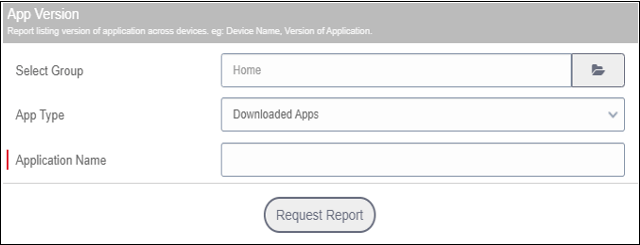
Note: You can enter the names of multiple applications using a comma.
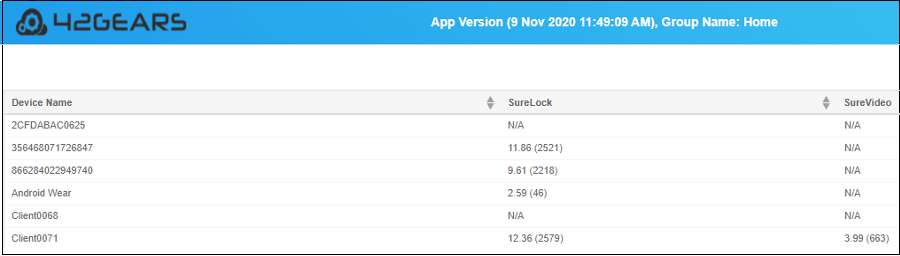
4. Click Request Report.5. Go to View Reports and click View or Download
Note:
Note: N/A
SureMDM, click here
30 days free trial, click here

Read more about our products: