From Location to Action: Enhancing Mobile Device Management with Map & Grid Views
Feb 24, 2026 | Nareddy Saivikas Reddy

Where are all your devices right now?
Are they evenly distributed across locations—or heavily concentrated in specific regions?
And when something goes wrong, how quickly can you pinpoint the exact device and take action?
Managing large fleets of geographically dispersed devices isn’t just about visibility—it’s about clarity. IT teams need a way to instantly understand where devices are, what state they’re in, and how to act without wasting time navigating complex dashboards.
That’s where the combination of Map View and Grid View makes all the difference.
By blending real-time geographic visualization with structured, data-rich listings, SureMDM delivers spatial awareness on device location and details. Whether you’re monitoring devices across cities, tracking indoor deployments in multi-storey buildings, or performing bulk administrative actions, this dual-view approach ensures you always have the right perspective at the right time.
Let’s explore how Map View and Grid View work together to simplify device monitoring.
Understanding SureMDM Map View
Map View focuses on geographical visualization. It presents the real-time or last-known location of devices on an interactive map, allowing users to instantly understand how devices are distributed across regions.
Map View intelligently groups devices by location density and displays aggregated counts. This approach ensures clarity even when the number of devices is large. As users interact with the map—zooming, panning, or selecting clusters—the view dynamically updates to reveal more granular information.
Key characteristics of Map View include:
- Real-time or near real-time device location rendering
- Intelligent clustering to represent device density
- Location-based device counts for quick insights
- Smooth interaction for exploration and navigation
- Tracking Android devices indoors even in multi-storey buildings
- Admins can select required group of devices and view their locations
Map View answers high-level questions quickly: Where are my devices? Which areas have higher activity? Are devices concentrated or widely distributed?
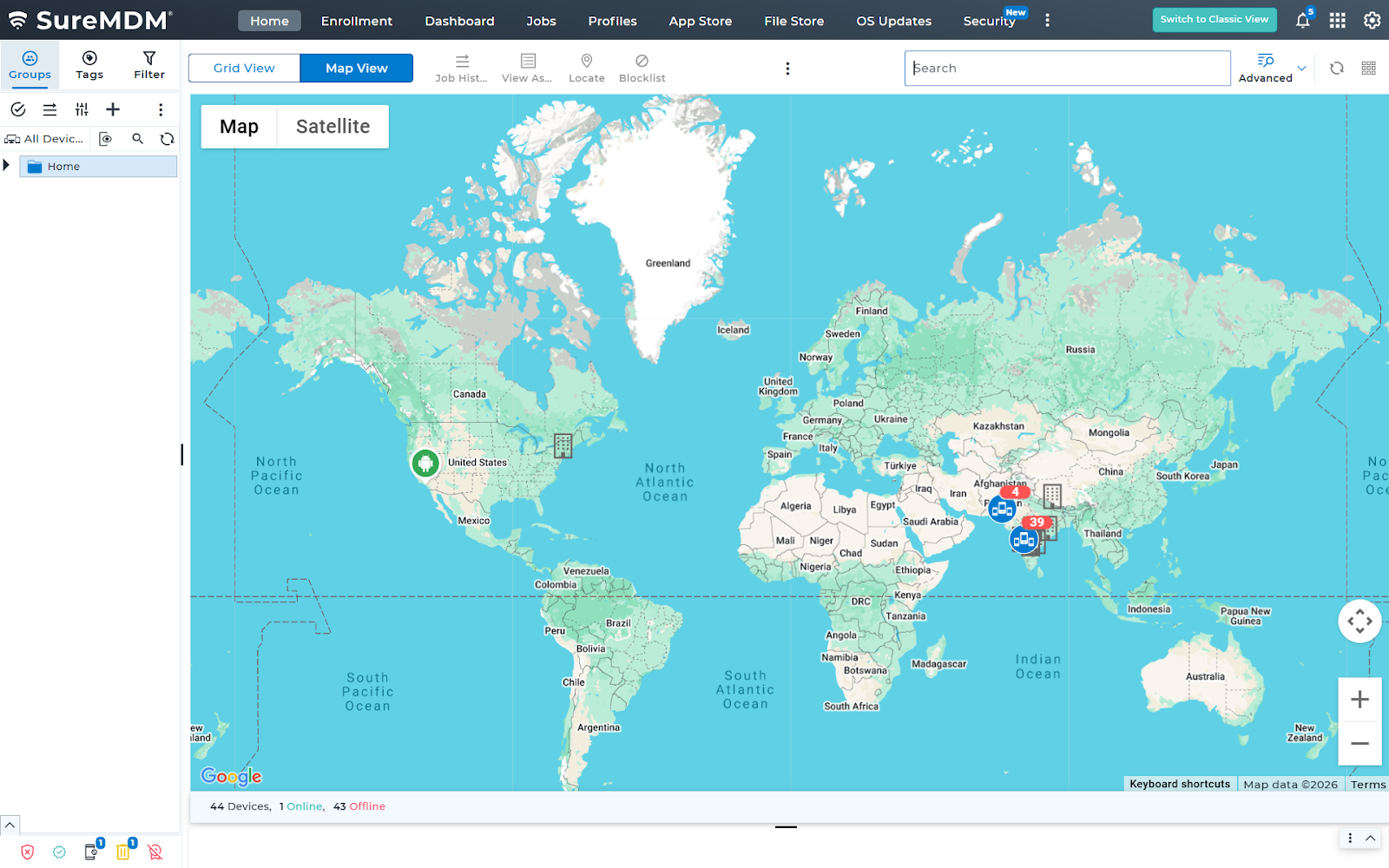
Device Interaction and Navigation
Interactivity is central to the Map View experience. When a user selects a device the interface transitions from geographical context to device-level insight. This interaction opens the Device Details view, where users can access deeper information about devices such as status, battery information, network information, license information, configuration, and activity history. This direct navigation minimizes friction and eliminates the need for manual searching, allowing users to move from observation to action in a single step.
This is how it looks on your SureMDM console.
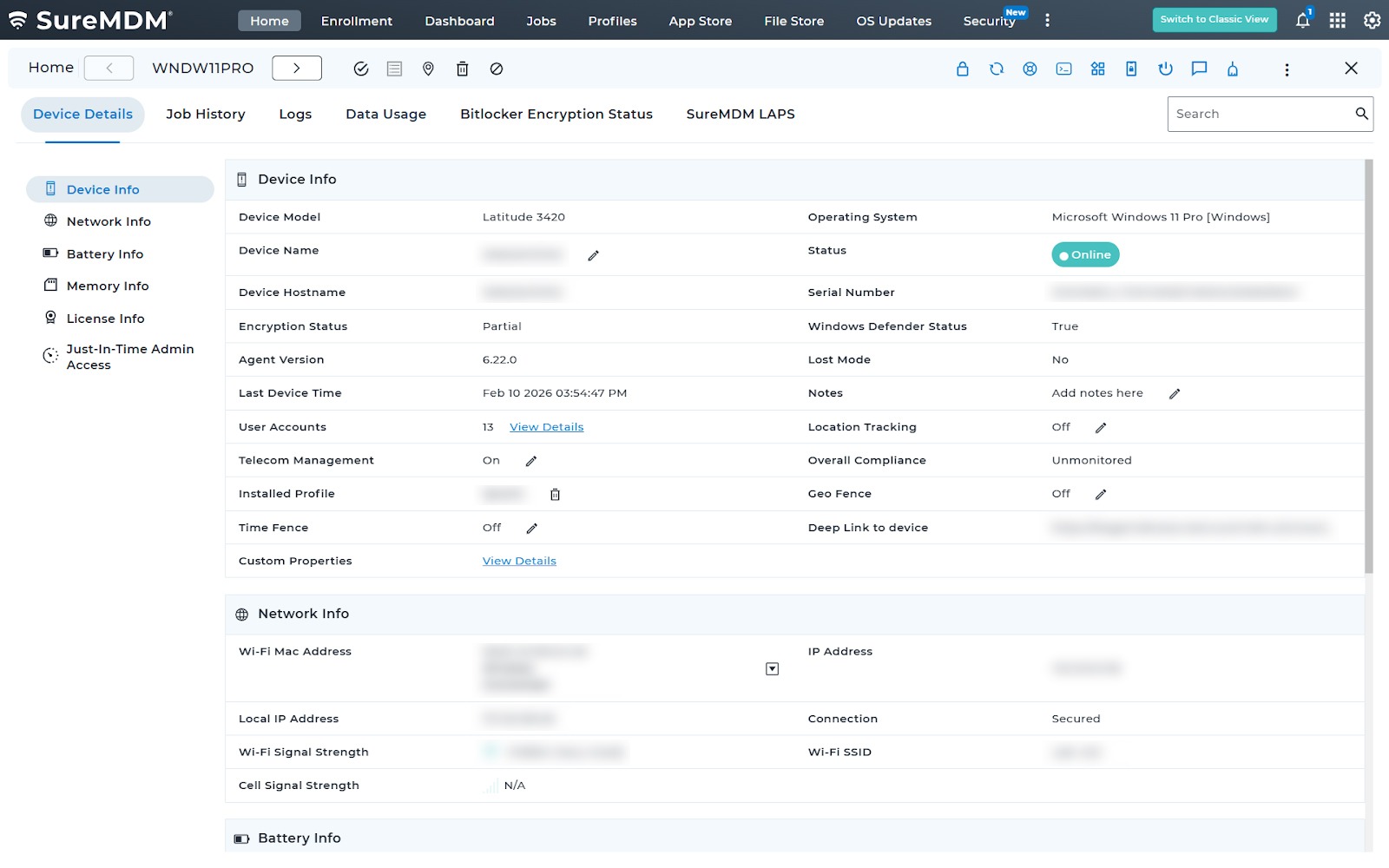
The Role of Grid View
While Map View excels at spatial understanding, Grid View is optimized for structured analysis. It presents devices in a tabular format, making it easier to scan, filter, sort, and compare attributes across multiple devices.
Grid View is especially effective when users need to:
- Search for specific devices
- Compare device states or attributes
- Perform bulk actions
- Monitor operational status at scale
By offering a consistent and predictable layout, Grid View complements the exploratory nature of Map View with precision and control.
Seamless Switching Between Views
The true power of this feature lies in the seamless transition between Map View and Grid View. Users can start with a geographic overview, identify areas or devices of interest, and then switch to a structured list for deeper analysis—or vice versa.
This dual-view approach supports different user workflows without forcing compromises, ensuring that both visual thinkers and data-driven users are equally supported.
Enhancing User Experience and Decision-Making
Combining Map View and Grid View creates a holistic monitoring experience:
- Map View provides situational awareness and spatial context
- Grid View delivers clarity, detail, and operational control
- Device detail navigation connects insight with action
Together, they improve efficiency and enable faster decision-making.
Wrapping Up
A well-designed Map View and Grid View feature transforms device monitoring from a static list into a dynamic, interactive experience. By visualizing live device locations, intelligently aggregating data, and enabling effortless navigation to device details, this approach empowers users to understand their ecosystem at a glance and act with confidence.
As device networks continue to grow in size and complexity, combining spatial intelligence with structured data presentation is no longer optional—it’s essential.
See Map View and Grid View in action
Subscribe for our free newsletter

Exclusive News and Updates on Enterprise Mobility!