Common Mobile Device Management Challenges in 2026
Dez 03, 2025 | Nareddy Saivikas Reddy
3.4 billion + 1.4 billion = 4.8 billion
Wondering what that number represents? That’s not just math — it’s the number of smartphone users worldwide: 3.4 billion on Android and 1.4 billion on iPhones.
Whether you're in a café, on a train, or just walking down the street, chances are everyone around you is holding a mobile device. Smartphones have blurred the lines between work and personal life, becoming our calendars, cameras, offices, and entertainment hubs all in one.
Not long ago, phones were just for calls and texts. Today, they’re everywhere — and they do everything from banking to business. But here’s the problem: many companies are still managing these devices manually… or not at all.
No controls. No visibility. No way to track what's happening on the devices that hold sensitive business data.
In this blog, we’ll walk through the biggest challenges businesses face when managing mobile devices without a robust Mobile Device Management (MDM) solution.
Key Mobile Device Management Challenges:
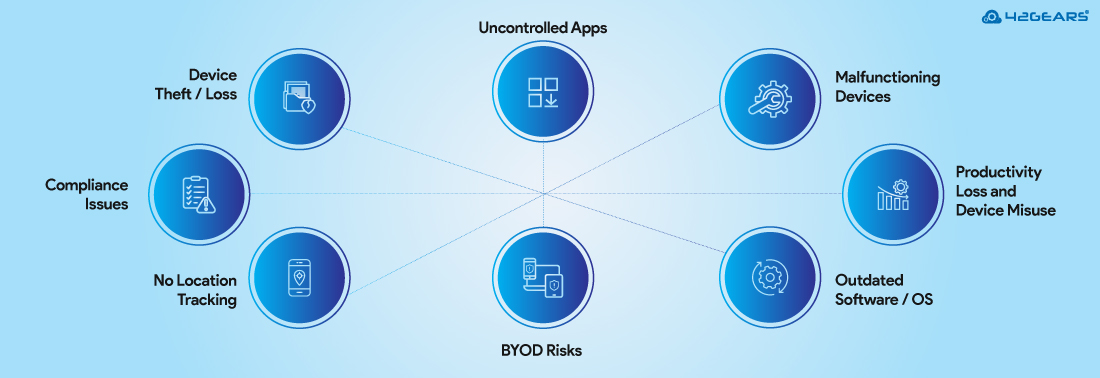
1. Device Theft or Loss Leads to Corporate Data Breach
Every year, millions of mobile devices are lost or stolen — and only a small fraction are ever recovered. Without a Mobile Device Management (MDM) solution, companies can't remotely lock, wipe, or track these devices. This lack of control can lead to data breaches, IP theft, and regulatory violations. With the average data breach costing $4.44 million1, the impact can be severe.
2. No Centralized Location Tracking
Without MDM, IT teams lack visibility into the real-time location of corporate devices. This can complicate logistics, compliance, and asset recovery—especially in field service or logistics-heavy industries.
3. BYOD Security Issues – Mixing Personal and Work Data
Bring Your Own Device (BYOD) policies are great for flexibility, but without MDM, there’s no data separation between personal and work content. This creates compliance risks, potential data leaks, employee privacy concerns, and legal complications if the company ever needs to wipe corporate data from a personal device.
4. Inconsistent Security Policies Across Devices
Without a centralized MDM, it's very time-consuming and error-prone to enforce standard security configurations like passcodes, encryption, or VPN usage across devices. Some users may have basic security, while others are completely exposed—creating vulnerabilities across your entire network.
5. Uncontrolled App Installations
Users may download unauthorized or malicious apps that can compromise sensitive data or introduce malware. With no MDM, there's no way to block installation of apps that are not approved by the company, enforce app updates, or ensure business-critical apps are always installed.
👉 In fact, a report uncovered over 200 malicious apps2 on Google Play alone, collectively downloaded more than 8 million times—highlighting the real risk of unvetted apps even from official sources.
6. No Remote Troubleshooting or Support
If a user experiences technical issues in the field, IT has no visibility or cannot take remote control of the devices without MDM. This leads to increased downtime, delayed resolutions, and frustrated employees—especially in remote or hybrid work setups.
7. Productivity Loss Due to Employee Distractions and Device Misuse
Without app/website restrictions, kiosk mode, or usage monitoring, devices can easily become
distractions. Employees may use corporate devices for gaming, social media, or streaming. The result? Lost productivity and disengaged employees. And it isn’t cheap: it’s costing the global economy $9.6 trillion3. How much is it costing your business?
8. Lack of Compliance and Audit Readiness
For industries like BFSI, healthcare, or government, data protection regulations require audit logs, policy enforcement, and controlled access to sensitive data. Without MDM, organizations struggle to demonstrate compliance with laws like GDPR, HIPAA, or RBI guidelines.
9. Software and OS Updates
Keeping devices updated manually is a nightmare. Without MDM, you can't enforce OS updates or patch management, which leaves some devices running outdated or insecure software—exposing your environment to vulnerabilities.
10. Inability to Manage Multiple Device Types (BYOD, WPCO, COBO)
Organizations often have a mix of ownership models—Bring Your Own Device (BYOD), Work Profile on Corporate-Owned (WPCO), and Corporate-Owned Business Only (COBO). Corporate Without MDM, managing this diversity becomes chaotic and inconsistent.
11. Data Usage and Cost Overruns
MDM lets you monitor data usage and set limits on mobile data consumption. Without it, data plans can be misused, leading to bill shocks and unexpected operational costs.
12. Onboarding and Offboarding Delays
Provisioning and de-provisioning devices manually wastes time. With no MDM, it’s harder to automate device setup for new hires or revoke access for exiting employees, increasing the risk of unauthorized data access.
Summing it Up
Stop Managing Mobile Devices Like It’s 2005
Smartphones have evolved. So should your device management strategy. With rising threats, tighter regulations, and more mobile workers than ever, managing devices without MDM is no longer an option—it’s a risk.
Don’t wait for a data breach or productivity crash to take action. Start securing and streamlining your mobile workforce today with SureMDM.
Statistics:
- IBM Cost of Data Breach Report
- Zscaler
- Mentl Space
FAQs
What are the security challenges faced by mobile devices?
Mobile devices are exposed to a wide range of security threats. Key challenges include:
- Risk of data leaks through apps, cloud backups, or messaging.
- Exposure to malware from unofficial or even official app stores.
- Vulnerability to phishing attacks via SMS, email, or fake apps.
- Connection to unsecured public Wi-Fi networks.
- Devices lacking encryption or strong authentication.
- Bring your down device security risks.
Why should businesses manage mobile devices with Mobile Device Management (MDM)?
Without MDM, businesses have little control over corporate data on mobile devices. The risks include:
- Lost or stolen devices leading to data breaches.
- No way to control or restrict unauthorized app usage.
- Inability to enforce security settings or push OS updates.
- Compliance violations due to lack of audit trails or data protection.
- Higher IT costs and user downtime due to manual device support.
What is the difference between COBO, COPE, and BYOD?
- COBO (Corporate-Owned Business Only): Devices used strictly for work; fully managed.
- COPE (Corporate-Owned Personally Enabled): Company devices that allow limited personal use. It is also known as WPCO (Work Profile on Corporate-Owned)
- BYOD (Bring Your Own Device): Employee-owned devices used for work, often with work profiles set up via MDM.
What types of mobile devices can MDM manage?
SureMDM supports a wide range of mobile devices, including:
- Android phones & tablets
- iPhones & iPads
- Rugged devices and mobile computers are used in logistics, field service, etc.
How does MDM support BYOD (Bring Your Own Device) policies?
SureMDM creates a container to separate work and personal data on employee-owned devices. IT admins have control over only company apps and data without touching employees’ personal data. It ensures that corporate data is secure and can be wiped if needed—without affecting personal apps or files.
Secure every device, everywhere
Subscribe for our free newsletter

Exclusive News and Updates on Enterprise Mobility!