Too Many Passwords? Why SAML Authentication is Your New Best Friend
dez 16, 2025 | Harshita B
Imagine this: It’s Monday morning. You grab your coffee, sit down at your desk, and open your laptop. First, you log in to your email. Then, your CRM. Then, the company-wide analytics tool. Then, the project management app.
Before you’ve even read a single email, you’ve already typed in four different passwords. You probably have a sticky note, a spreadsheet, or a (hopefully) secure password manager bulging with dozens of unique credentials.
This isn't just annoying; it's a security risk and a productivity drain. This is the exact problem that Single Sign-On (SSO) solves, and the working behind it is often a protocol called SAML. But first….
What is SAML?
SAML (pronounced "sam-el") stands for Security Assertion Markup Language.
At its core, SAML is an open-standard, XML(Extensible Markup Language)-based framework that allows security systems to talk to each other. Specifically, it enables one system (your identity provider) to pass your authentication credentials to another system (a service or app) securely.
In simple terms, SAML is the trusted messenger that tells all your apps, "This user is legit. I've checked their ID, and you can let them in." This process is the foundation of SAML authentication, which makes single sign-on (SSO) possible.
The Key Players in a SAML Authentication Process
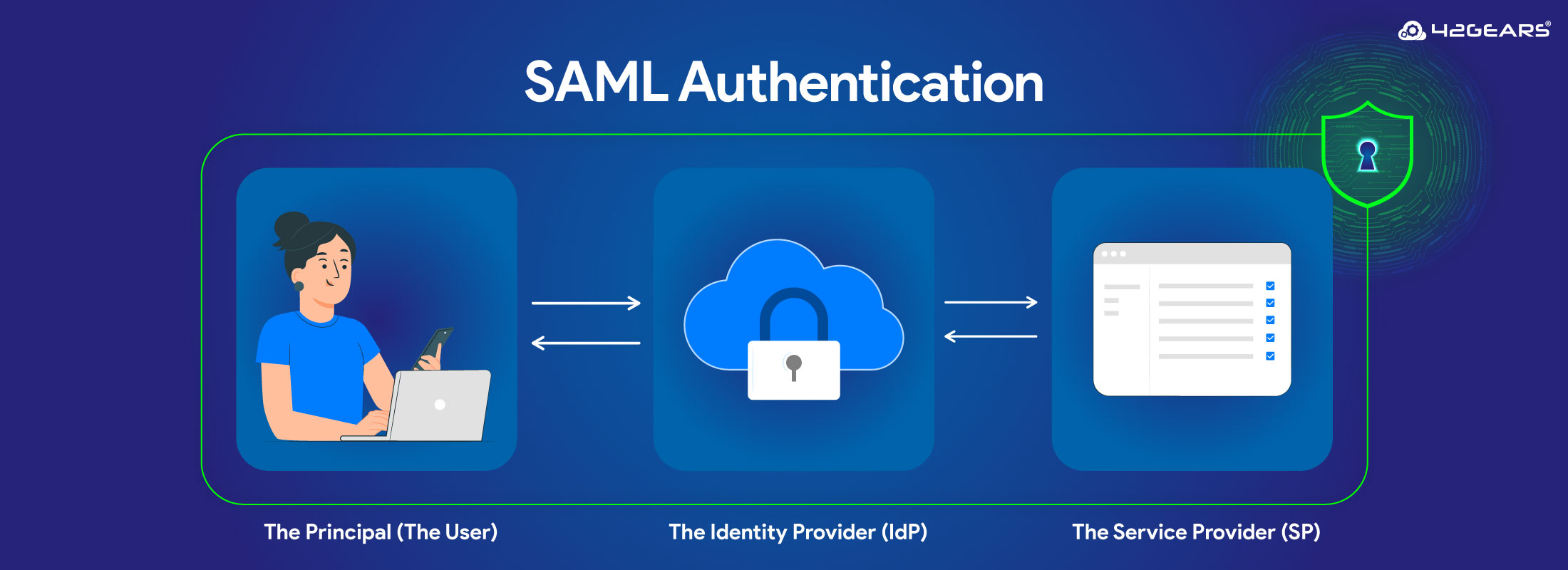
To understand how SAML works, you first need to know the three main parties involved:
- The Principal (The User): That’s you, trying to access an application.
- The Identity Provider (IdP): This is the "master" system that holds and verifies your identity. Think of it as the central security checkpoint. Common IdPs include Okta, Microsoft Azure AD, OneLogin, and SureIdP by 42Gears.
- The Service Provider (SP): This is the application or service you want to access, like Salesforce, Google Workspace, or even the SureMDM console itself.
How Does SAML Authentication Work? (A Simple Analogy)
Let's stick with our Monday morning scenario. You want to access your CRM (the Service Provider).
Instead of a login screen, the CRM "sees" you aren't authenticated and redirects you to your company's central login portal (the Identity Provider).
- Authentication: You enter your one, single password (and maybe an MFA code) into the IdP portal.
- Verification: The IdP checks your credentials. It confirms you are who you say you are.
- The "SAML Assertion": The IdP generates a secure, digitally signed XML document called a SAML Assertion. This assertion is like a temporary, encrypted ID card that says, "I, the IdP, have successfully authenticated this user at this specific time. They are cleared for access."
- The Redirect: The IdP sends this assertion to your CRM (the Service Provider).
- Trust & Access: The CRM, which has a pre-established trust relationship with your IdP, validates the digital signature on the assertion. It confirms it's legit, reads the information, and—voilà—logs you in without you ever having to type another password.
This entire workflow happens in seconds, and it's what makes SAML SSO feel so seamless.
The Business Benefits of SAML SSO
Implementing single sign-on using SAML isn't just about convenience; it's a powerful business strategy.
- Dramatically Improved Security: Instead of 50 weak or reused passwords, employees have one strong, complex password to protect. Security teams can then focus on securing that one central login point with policies like Multi-Factor Authentication (MFA).
- Reduced IT Costs & Friction: This is a big one. According to Gartner, 40% of all IT help desk calls are for password resets[1]. SAML-based SSO virtually eliminates this massive cost and time sink.
- Boosted Productivity: Employees get into their tools faster. New hires can be provisioned instantly. There's no more "I'm locked out" downtime.
- Centralized Access Control: When an employee leaves the company, you don't have to scramble to de-provision 20 different cloud apps. You just disable their one account in the identity provider, and their access to everything is instantly revoked.
How SureMDM Leverages SAML for Total Security
In the world of Unified Endpoint Management (UEM), identity is everything. You need to ensure that only the right people are managing your fleet of devices and that only the right devices are accessing corporate resources.
SureMDM by 42Gears embraces the power of SAML in two critical ways:
- As a Service Provider (SP): Secure your MDM console. You can integrate SureMDM with your existing IdP (like Azure AD, Okta, etc.) to enable single sign-on for your IT administrators. No more separate passwords—just seamless, secure access.
- As an Identity Provider (IdP): With SureIdP, SureMDM can act as the central source of truth itself. You can use it to authenticate device enrollments, add policy-driven OS login profiles, ensuring that only company-approved users with valid credentials can add a new device to your managed fleet.
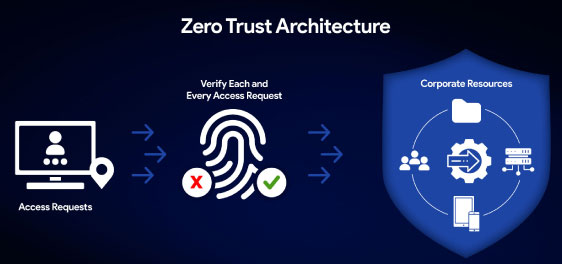
By using SAML, SureMDM helps you build a true Zero Trust framework, where identity is verified at every step, from the admin logging in to the device being enrolled.
Frequently Asked Questions (FAQs)
What is the difference between SAML and SSO?
Single Sign-On (SSO) is the concept—the ability to log in once and access multiple applications. SAML is the technology—an open-standard protocol that makes SSO possible by securely exchanging authentication data.
What is a SAML Assertion?
A SAML Assertion is the XML document that the Identity Provider (IdP) sends to the Service Provider (SP). It contains the user's identity, attributes, and security information, essentially "asserting" that the user is authenticated.
Is SAML secure?
Yes. SAML is a mature and secure standard. It uses digital signatures and (often) encryption to ensure that the assertions are authentic and cannot be tampered with.
What is SAML 2.0?
SAML 2.0 is the most current version of the standard, released in 2005. It brought major improvements and is the version used by virtually all modern systems.
Source:
1, 2. specopssoft.com
3. Okta
Ready to Secure Your Endpoints with
Modern Authentication?
Subscribe for our free newsletter
Exclusive News and Updates on Enterprise Mobility!