


Mobile App Security Testing: The Complete Guide
Mar 26, 2026 | Harshita B

1. What Is Mobile App Security Testing?
Let's be honest: in 2026, we trust our phones more than we trust our own memories. We use them for banking, medical records, dating, and ordering 2 AM tacos. But while you're busy perfecting your app's dark mode, there's a threat actor somewhere identifying the gap between what your app claims to protect and what it actually protects.
Mobile App Security Testing (MAST) is the systematic process of identifying vulnerabilities in mobile applications — across iOS and Android — before attackers exploit them. Think of it as a comprehensive health check: instead of looking for physical flaws, you're hunting for weak authentication, data leaks, insecure APIs, and hidden backdoors.
MAST covers three primary testing domains:
- Static Application Security Testing (SAST): Analyzing source code or compiled binaries without executing them.
- Dynamic Application Security Testing (DAST): Testing the app in a running state to observe real-time behavior.
- Interactive Application Security Testing (IAST): A hybrid approach that instruments the app during runtime.

2. Why It Matters: The Real Cost of Mobile App Breaches
Failing at mobile app security testing isn't a "minor error" — it's an engraved invitation for a data breach.
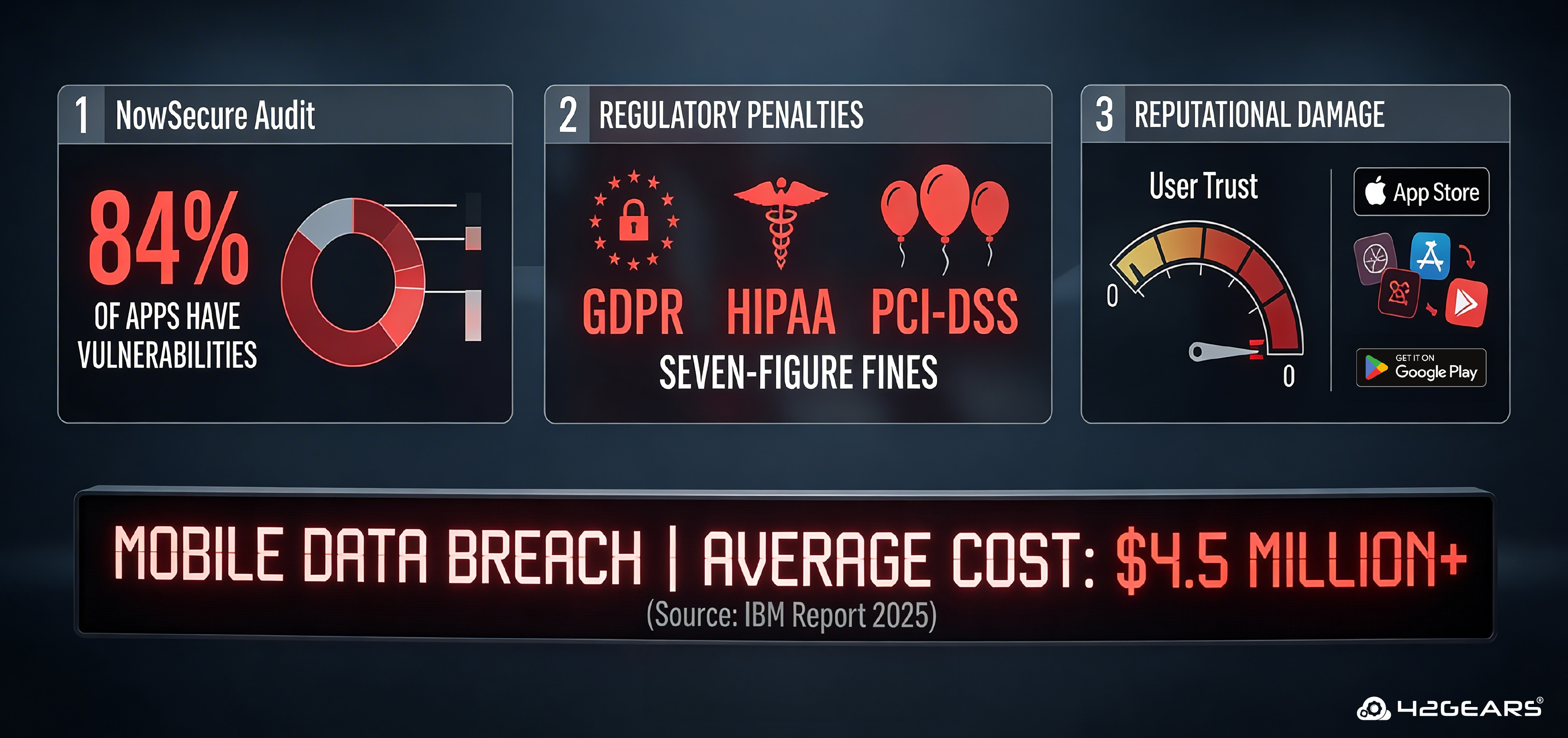
- The average cost of a mobile data breach in 2025 exceeded $4.5 million per incident (IBM Cost of a Data Breach Report).
- 84% of apps tested by NowSecure had at least one security vulnerability.
- Regulatory penalties under GDPR, HIPAA, and PCI-DSS have ballooned — a single insecure mobile endpoint can trigger seven-figure fines.
The reputational damage is often worse than the fine. Apps removed from the App Store or Google Play lose user trust that takes years to rebuild.
3. The Four Pillars of MAST
To perform effective mobile app security testing, you can't just poke at the UI. Security teams rely on four foundational layers:
Pillar 1: Static Analysis (SAST)
Examining the code without running it. This catches hardcoded API keys, insecure cryptography, overly permissive code logic, and dangerous function usage before a single line is deployed.
Best for: Early-stage testing, CI/CD pipeline integration, identifying developer-introduced flaws.
Pillar 2: Dynamic Analysis (DAST)
Testing the app in a live environment to observe how it handles memory, user sessions, data in transit, and runtime inputs. This is where logic flaws that look fine on paper reveal themselves under real conditions.
Best for: Authentication flows, session management, API calls, and network interception.
Pillar 3: API Security Testing
Your app is only as secure as the backend it talks to. API security testing validates that the "handshake" between your mobile client and backend servers is authenticated, encrypted, and not susceptible to injection, broken object-level authorization (BOLA), or excessive data exposure.
Best for: REST/GraphQL APIs, token validation, rate limiting, data exposure audits.
Pillar 4: Forensic / Device Analysis
Ensuring the app doesn't leave sensitive "digital crumbs" on the device — unencrypted cache files, logs containing PII, tokens stored in SharedPreferences or NSUserDefaults, screenshots cached by the OS.
Best for: Post-compromise analysis, compliance audits, BYOD enterprise environments.

4. Open Web Application Security Project (OWASP) Mobile Top 10 (2025–2026)
The OWASP Mobile Application Security (MAS) standard is the industry's primary blueprint for mobile security. It defines the OWASP Mobile Top 10 — the most exploited mobile vulnerabilities in the wild. Every mobile security program should map its testing to this list.
| # | Vulnerability | What Happens | Real-World Example |
| M1 | Insecure Data Storage | Sensitive data (tokens, PII, credentials) stored in plaintext on the device | Auth tokens found unencrypted in SQLite databases |
| M2 | Inadequate Supply Chain Security | Vulnerabilities hidden in third-party SDKs and libraries | Malicious ad SDK exfiltrating device data |
| M3 | Insecure Authentication / Authorization | Weak passwords, bypassable "remember me" features, and missing token expiry | JWT tokens accepted without signature validation |
| M4 | Insufficient Input/Output Validation | Unvalidated inputs processed by the app or backend | SQL injection via mobile form fields |
| M5 | Insecure Communication | Data transmitted over the network without proper SSL/TLS, or with pinning bypass | Man-in-the-middle attack on an HTTP endpoint |
| M6 | Inadequate Privacy Controls | Unnecessary collection or logging of sensitive user data | PII written to crash logs sent to third parties |
| M7 | Insufficient Binary Protections | App binary lacks obfuscation, is trivially reversible | Reverse-engineered app reveals business logic or keys |
| M8 | Security Misconfiguration | Debug flags left on, overly permissive Android manifests, exposed backup features | android:allowBackup="true" exposes app data |
| M9 | Insecure Data Storage (Cloud/Server-Side) | Misconfigured S3 buckets, Firebase open to the world | Exposed Firebase database leaks millions of records |
| M10 | Code Tampering | Hackers modify your app's binary to create a cracked or malicious version | Repackaged banking app with a keylogger distributed via sideloading |
Tip: Use the OWASP MASVS (Mobile Application Verification Standard) alongside the Top 10. It provides granular, testable security requirements at three maturity levels: L1 (baseline), L2 (defense-in-depth), and R (resilience against reverse engineering).
5. Top MAST Tools: Free & Open Source
Knowing the risks is half the battle; the other half is having the right gear. Here are the most trusted open-source tools in the mobile security community, organized by use case:
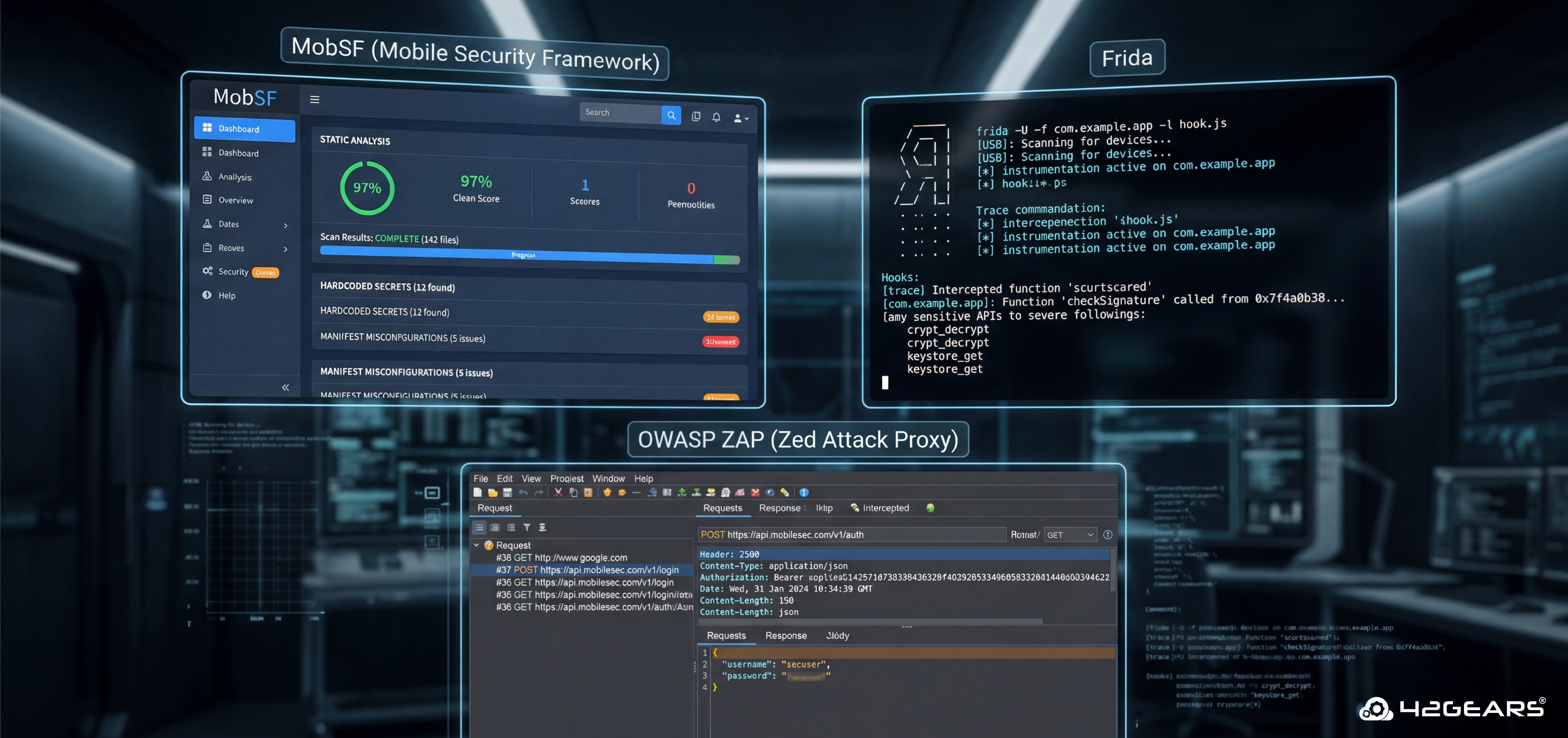
1. MobSF (Mobile Security Framework): The Swiss Army knife of mobile security testing. MobSF performs automated static and dynamic analysis for both Android (.apk/.aab) and iOS (.ipa) apps. It generates detailed reports covering hardcoded secrets, insecure API calls, manifest misconfigurations, and more. Ideal as a first-pass scanner in CI/CD pipelines.
- GitHub: github.com/MobSF/Mobile-Security-Framework-MobSF
- Best for: Rapid automated audits, CI/CD integration, both platforms
2. Frida: Frida is a world-class dynamic instrumentation toolkit that lets you inject JavaScript snippets into native apps on iOS and Android. Use it to bypass SSL pinning, hook into authentication functions, and trace sensitive API calls at runtime. Virtually every professional mobile penetration tester has Frida in their toolkit.
- Best for: SSL pinning bypass, runtime analysis, function hooking, jailbreak/root detection bypass
3. OWASP ZAP (Zed Attack Proxy): The gold standard for intercepting and testing your app's network communication. Configure your device to proxy traffic through ZAP to inspect API calls, modify requests, and test for injection flaws, broken authentication, and data exposure in transit.
- Best for: API security testing, traffic analysis, fuzzing, session token analysis
4. Burp Suite Community Edition: Widely used alongside or instead of ZAP for intercepting mobile traffic. The Community edition covers most manual testing scenarios.
Android-Specific Testing Tools
Drozer: A specialized Android security assessment framework that interacts directly with the Dalvik VM. Drozer discovers attack surfaces through Android's IPC mechanisms — content providers, activities, broadcast receivers, and services — that other tools miss.
- Best for: Android component exposure, intent-based attacks, content provider injection
QARK (Quick Android Review Kit): A developer-friendly static analysis scanner that flags Android-specific misconfigurations, pending intents, exported components, and insecure data storage patterns in source code.
- Best for: Android source code review, developer-facing security scanning
iOS-Specific Testing Tools
Objection (built on Frida): Objection provides a runtime mobile exploration toolkit for iOS and Android, with especially powerful features for iOS: bypassing jailbreak detection, dumping the keychain, exploring the file system, and patching apps on-the-fly.
iMazing / objection + Frida for IPA analysis: For extracting and analyzing iOS app binaries and data containers without a jailbreak in some scenarios.
6. Android vs. iOS Security Testing: Key Differences
Neither platform is inherently "more secure" — they have different threat models and attack surfaces.
| Aspect | Android | iOS |
| App Distribution | Open sideloading possible; higher malware risk | App Store gated; lower malware risk, but jailbroken devices are exposed |
| Binary Analysis | DEX bytecode; easily decompiled with jadx or apktool | Compiled ARM binary; requires class-dump or Hopper for analysis |
| Sandboxing | Enforced, but inter-app communication via Intents creates an attack surface | Strong sandboxing; limited IPC, but URL schemes can be abused |
| Data Storage Risks | SharedPreferences, SQLite, external SD card | NSUserDefaults, Keychain (secure), plist files |
| SSL Pinning Bypass | Frida + custom scripts or Objection | Objection, SSL Kill Switch 2, or Frida scripts |
| Testing Device | Rooted device or emulator (Android Studio) | Jailbroken device preferred; some tests possible on non-jailbroken |
| Key Tools | MobSF, Drozer, apktool, jadx, QARK | MobSF, Objection, iProxy, Frida, class-dump |
Conclusion
Mobile app security isn't a "one-and-done" checklist — it's a continuous discipline. Threats evolve, libraries introduce new vulnerabilities, and every feature you ship creates a new attack surface. The teams that stay ahead aren't the ones who test hardest before launch; they're the ones who've embedded security thinking into every phase of how they build.
Start with the OWASP MASVS as your baseline. Integrate MobSF into your CI/CD pipeline. Train your developers on secure mobile coding practices. Run a real penetration test before your next major release. One thing that often gets overlooked is where that testing actually happens. For mobile app security testing, a private device farm where you have total control over all devices is optimal. AstroFarm is a private device farm solution that lets you connect your own real iOS and Android devices, giving your security team direct access to the actual environments your users run. Whether you're running Frida-based dynamic analysis, intercepting traffic through Burp Suite, or validating that your SSL pinning holds up on a specific Android OEM build, AstroFarm ensures your testing reflects real-world conditions — not just emulator approximations.
Your users trust your app with their data, their money, and often their identity. That trust is the most valuable thing your product has — and it's worth protecting on real devices, under real conditions.
FAQs
How long does a mobile app security test take?
A basic automated scan takes hours. A thorough manual penetration test for a mid-complexity app typically takes 3–5 business days. Enterprise-grade assessments with source code review and full MASVS coverage can take 2–3 weeks.
What's the difference between a vulnerability assessment and a penetration test?
A vulnerability assessment identifies and catalogs potential weaknesses. A penetration test goes further — testers actively attempt to exploit those weaknesses to demonstrate real-world impact. For compliance and high-risk apps, penetration testing is strongly recommended.
Do I need to test both Android and iOS versions separately?
Yes. While the backend API vulnerabilities often overlap, the platform-specific attack surfaces (binary protections, storage mechanisms, IPC) are different and require separate assessment.
How often should I perform mobile app security testing?
At a minimum: before every major release and after significant architectural changes. Best practice: integrate automated scanning into every CI/CD build, and conduct a full manual pentest at least annually or after major feature launches.
Is there a certification for mobile app security testers?
Yes. Relevant certifications include GMOB (GIAC Mobile Device Security Analyst), eMAPT (eLearnSecurity Mobile Application Penetration Tester), and the broader OSCP and CEH certifications, which include mobile components.
Better Mobile App Security Testing Awaits.
Check out AstroFarm!
Subscribe for our free newsletter

Exclusive News and Updates on Enterprise Mobility!
