The Modern Guide to Linux Fleet Automation: How to Scale, Secure, and Standardize Your Infrastructure
Apr 08, 2026 | Rinkalkumar Bhanderi
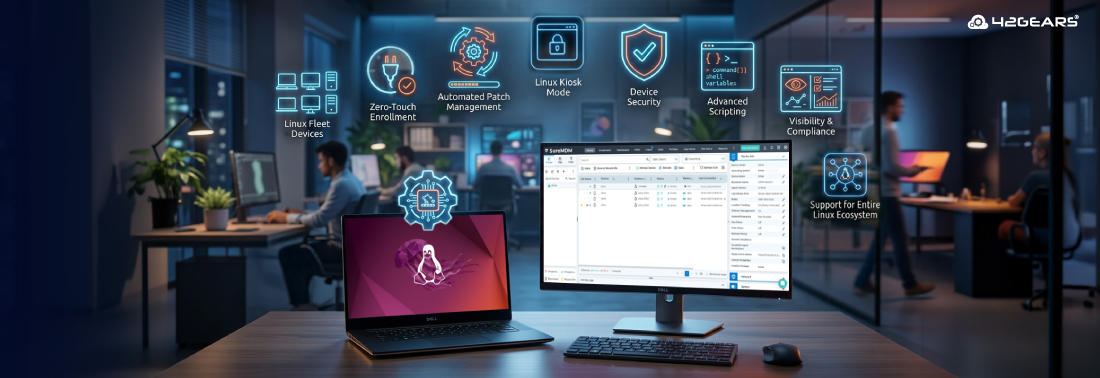
In the early days of enterprise IT, Linux was the "specialist" operating system. It lived in the server room, managed by a handful of experts who knew every shell command by heart. But the landscape has shifted. Today, Linux is everywhere. It’s the engine behind your self-service kiosks, the brain inside your industrial IoT sensors, the workstation of choice for your developers, and the backbone of your digital signage.
As your Linux fleet grows from five machines to five thousand, a critical question emerges: How do you keep them all in sync without drowning in manual tasks?
The answer lies in Automation through Unified Endpoint Management (UEM). At 42Gears, we believe that managing a Linux fleet shouldn’t feel like a high-wire act. It should be predictable, scalable, and—most importantly—automated.
In this guide, we’ll explore how to move beyond manual scripting and leverage SureMDM to automate your Linux infrastructure while maintaining ironclad security.
Why Manual Linux Device Management Doesn’t Scale
Many IT teams start managing Linux devices via SSH (Secure Shell) and custom Bash scripts. While this works for a small cluster, it introduces three major risks as you scale:
- Configuration Drift: Over time, individual devices receive manual "quick fixes." Soon, no two devices are identical, making troubleshooting a nightmare.
- The Vulnerability Window: When a new security patch is released, manually updating a distributed fleet takes days or weeks. That is a window of opportunity for threats.
- Lack of Visibility: You can’t manage what you can’t see. Without a centralized dashboard, knowing which devices are online, which are compliant, and which are failing becomes guesswork.
1. Automation: The Heart of the Modern Linux Fleet
Automation is more than just running a script; it’s about defining a "Desired State" and letting your management tool enforce it. With SureMDM, automation for Linux is built into the entire lifecycle of the device.
Zero-Touch Enrollment and Provisioning
The moment a new Linux device is unboxed, the clock starts ticking. Automated enrollment allows IT teams to add devices to the management console in bulk. Once enrolled, SureMDM uses Jobs and Policies to automatically:
- Configure Wi-Fi and network settings.
- Deploy essential security certificates.
- Install required enterprise applications.
- Set user permissions.
By automating the "Day 0" setup, you ensure that every device—whether it’s a Raspberry Pi in a warehouse or a Ubuntu laptop in London—starts its life with the exact same security posture.
Automated Patch Management
Security is a race against time. SureMDM simplifies Linux Patch Management by allowing admins to remotely deploy OS patches and software updates (.deb or .rpm packages) across the fleet.
- Scheduled Rollouts: Don’t interrupt productivity. Schedule updates for 2:00 AM local time.
- Silent Installation: Push updates in the background so the end-user never sees a terminal window or a "Sudo" prompt.
2. Restricting the Environment: Security through Lockdown
Linux is famous for its openness and flexibility. In a developer’s hands, that’s a feature. In a retail kiosk or a factory floor, that’s a vulnerability. Part of a robust automation strategy is restricting what a device can do to prevent accidental or intentional misuse.
Linux Kiosk Mode
One of the most powerful capabilities of SureMDM is the ability to lock down a Linux device into Linux Kiosk Mode. This transforms a general-purpose OS into a dedicated-purpose tool.
- Single-App Mode: The device boots directly into a specific application (like a web browser for a check-in kiosk) and prevents the user from exiting to the desktop.
- Multi-App Mode: Provide a curated "walled garden" of approved apps, hiding the file system, terminal, and system settings.
Peripheral and Hardware Restrictions
Automation also extends to hardware security. You can remotely (and automatically) disable USB ports to prevent data theft via thumb drives, or disable Bluetooth and camera access on devices located in sensitive areas.
3. Advanced Automation: Scripting and Remote Commands
While SureMDM provides a high-level UI, we know that Linux admins love the power of the command line. That’s why we’ve built Remote Scripting into the heart of our platform.
Imagine you need to change a configuration line in /etc/ssh/sshd_config across 1,000 devices. Doing this manually is impossible. With SureMDM, you can:
- Write a simple Bash script.
- Upload it to the SureMDM console.
- Target a specific group (e.g., "All Production Servers").
- Hit Run.
The console provides real-time feedback on which devices successfully executed the script and which were offline, automatically retrying the job the moment those offline devices reconnect.
4. Visibility and Compliance: The "Audit-Ready" Fleet
Automation isn't just about doing things; it's about knowing things. SureMDM provides automated "Health Checks" that monitor your Linux fleet 24/7.
- Compliance Rules: You can set a rule that says: "If a device is not running the latest security patch, or if it has been offline for more than 48 hours, mark it as Non-Compliant."
- Automated Remediation: If a device falls out of compliance, SureMDM can automatically trigger a "remediation job"—such as locking the device or sending an alert to the IT team—to mitigate risk instantly.
5. Support for the Entire Linux Ecosystem
One of the biggest challenges in Linux device management is the sheer variety of distributions (distros). A tool that only works on Ubuntu is only half a solution.
SureMDM is designed to be distro-agnostic. Whether your organization relies on Ubuntu, Red Hat (RHEL), Debian, CentOS, Fedora, or Rocky Linux, SureMDM provides a consistent management experience. This even extends to ARM-based devices like the Raspberry Pi, which are increasingly used in IoT and industrial automation.
The 42Gears Advantage: Unified Management
The true power of using SureMDM for Linux automation is that it doesn’t exist in a vacuum. Most modern enterprises are "cross-platform." You likely have Windows laptops in HR, iPads in Sales, and Linux kiosks in the lobby.
Instead of using three different tools to manage three different operating systems, SureMDM gives you a Single Pane of Glass. You can apply the same logic of automation, restriction, and compliance to your Linux devices that you already use for your mobile and desktop fleets.
Key Benefits of SureMDM for Linux:
- Centralized Control: Manage your entire fleet from any web browser.
- Enhanced Security: Enforce password policies, remote wipe lost devices, and lock down ports.
- Reduced Operational Costs: Automation reduces the need for "boots on the ground" and manual IT intervention.
- Improved Uptime: Remote troubleshooting and automated health checks identify problems before they cause a shutdown.
Ready to Automate Your Linux Journey?
Managing Linux devices at scale doesn't have to be a manual chore. By embracing an MDM-led approach to automation, you can ensure your devices are secure, restricted to their intended purpose, and always up to date.
Whether you are looking to secure a fleet of developer workstations or manage a global network of Linux-based IoT sensors, 42Gears SureMDM provides the tools you need to stay in control.
Don’t just manage your
devices—empower them.
Subscribe for our free newsletter

Exclusive News and Updates on Enterprise Mobility!