SureMDM: Your All-in-One Solution for Samsung Device Management
From Setup to Security: Manage Every Aspect of Samsung Device Management with Confidence
Overview of Samsung Devices
Samsung, one of the global leaders in mobile devices and technology, offers a wide range of devices, from smartphones and tablets to wearables. Known for their cutting-edge technology, sleek designs, and robust performance, Samsung devices are utilized by individuals, businesses, and organizations worldwide. Their diverse product lineup caters to different needs, including personal entertainment, productivity, and enterprise management.
For businesses and organizations managing large fleets of Samsung devices, several challenges can arise. IT administrators often face the time-consuming tasks of manually configuring devices to meet specific business requirements, leading to inefficiencies and inconsistent configurations.
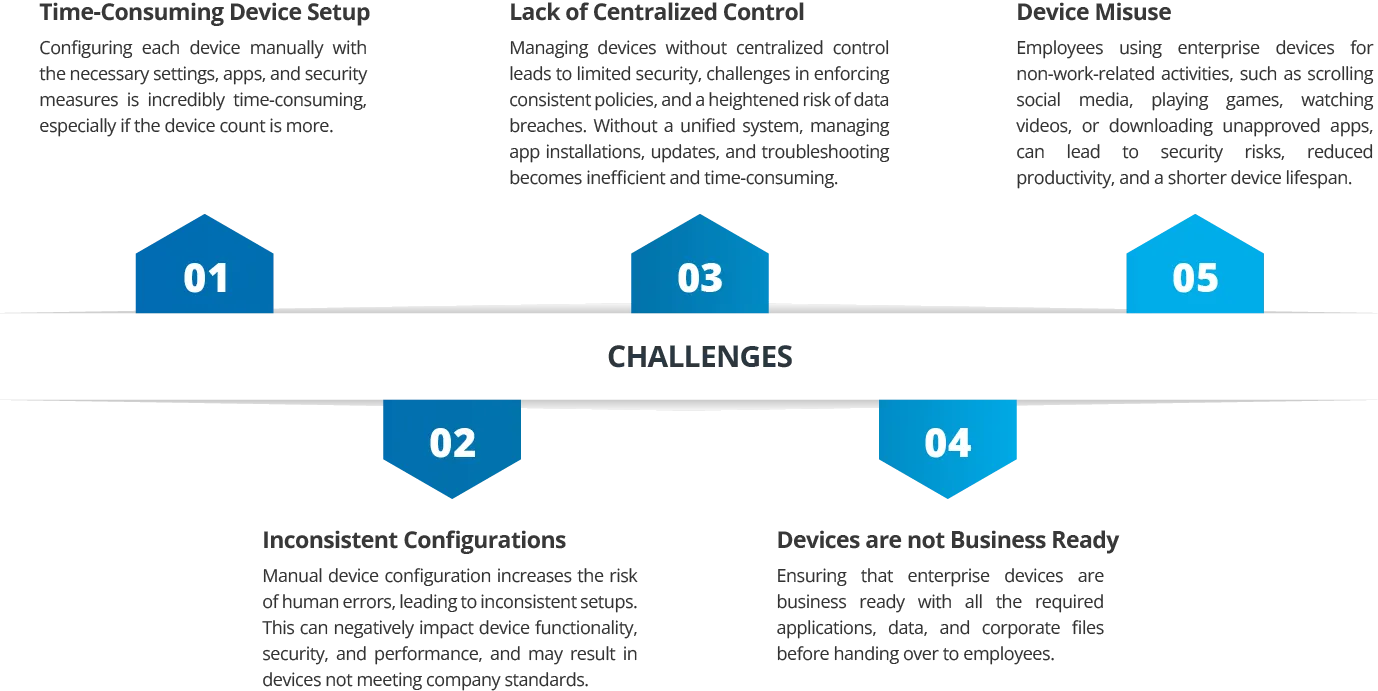
Challenges Without Samsung Device Management
Without a Samsung Device Management in place, businesses risk encountering significant inefficiencies and security vulnerabilities. Below are some of the key challenges that arise when managing Samsung devices without a dedicated management solution:
To address these challenges businesses need a reliable Samsung Device Management (MDM) solution to secure, monitor, and manage Samsung devices.
What is Samsung Device Management?
Samsung Device Management or Samsung MDM, refers to a suite of features that helps IT admins to simplify and centralize the process of managing Samsung devices remotely. Samsung devices along with SureMDM, offer a more streamlined approach for improved productivity, increased ROI, and enhanced device security.
Key Features of SureMDM Samsung Device Management
Samsung Knox Mobile Enrollment: Enroll enterprise devices into SureMDM using Samsung Knox Mobile Enrollment (KME). It helps IT administrators easily deploy and manage large fleets of devices with minimal manual intervention. By providing zero-touch enrollment, it ensures a secure and efficient setup for employees.
- Simplifies the enrollment of Samsung devices into SureMDM.
- Automates device configuration and application deployment.
- Supports bulk device provisioning, reducing IT workload.

Device Management
Device Configuration
Provision large number of devices with required settings and policies.
Application and Content Management
Remotely install, uninstall, and update applications, track the app deployment status, and transfer the corporate documents onto devices, ensuring they are business ready.
Remote Control
Take control of the devices remotely to diagnose and troubleshoot malfunctioned devices.
Device Inventory Management
Monitor device health and performance parameters such as battery temperature, CPU usage, RAM consumption, etc., of the devices for optimal performance.
Kiosk Management
Application Kiosk
Convert Samsung devices into dedicated application kiosk devices by locking them to only business-approved applications.
Web Kiosk
Convert Samsung devices into secure browsers by restricting access to only business-related websites.

Digital Signage
Turn Samsung devices into digital signage displays and loop media content like videos, images, and presentations.
Usage analytics
Track the usage of applications, websites, and most viewed videos.
Security Management
Mobile Threat Defense (MTD)
Secure Samsung devices against latest cyberthreats like malware and fake malicious apps. Configure application scanning, make informed decisions based on app scan reports and dashboards.
Zero Trust Network Access (ZTNA)
Ensure secure access to corporate resources by continuously verifying users and devices, enforcing strict access policies rather than relying on traditional perimeter defenses.
Remote Lock and Wipe
Safeguard sensitive data on devices by remotely locking or wiping off the data when a device is lost or misplaced.
Device Compliance Policies
Set organization-wide security protocols for identity management, access control, and password policies. Monitor non-compliant devices based on OS version, security patch level, connectivity, SIM changes, location, and app policies, and take appropriate actions.
Location Tracking and Fencing
Location Tracking
Track the current location of a device and view its movement history to understand the route it took before reaching its destination.
Geo Fencing
Establish a virtual boundary around a specific geographical location and set up tasks to be executed on devices when users either enter or exit this defined geographical area.
Time Fencing and Network Fencing
Creates a periodical time boundary or network boundary for mobile devices to behave or function in a specified way when the device either enters or exists configured boundary.
Use Cases of Samsung Devices and SureMDM
1
Education Industry:
- Challenges: Students getting distracted while studying, difficulty accessing educational content online, and disruptions from technical glitches create obstacles to effective learning.
- Solution: Using Samsung devices with SureMDM enables IT admins to remotely configure devices with essential policies, educational apps, and content. It also allows for restricting student access to specific apps and websites. Admins can also troubleshoot devices remotely and set up virtual geo-fencing, sending alerts when students leave school boundaries.
- Outcome: Students remain focused on learning, IT teams efficiently manage devices remotely with zero distractions, and devices are secured from leaving the school boundaries.

2
BFSI Industry:
- Challenges: Ensuring that devices used by employees to access sensitive customer data are properly secured, equipped with the necessary apps and documents, and free from distractions is crucial for maintaining productivity and data protection at work.
- Solution: SureMDM allows IT admins to secure devices with various security policies, ZTNA, and MTD. It also supports remote management of app installations and document transfers, restricts access to work-related apps and documents, and provides remote wipe capabilities for lost or stolen devices.
- Outcome: Sensitive customer data was protected, reducing the risk of security breaches, employees can access work related content with ease, and remain focused while on work.
Why Choose SureMDM for Samsung Mobile Device Management
- Seamless Integration with Samsung Knox: SureMDM integrates with Samsung Knox Mobile Enrollment (KME), making it easy to set up and deploy Samsung devices in bulk. New devices are automatically configured with the company’s security policies and settings, reducing manual setup time.
- Samsung Knox Validated Partner: As a Knox-validated partner, SureMDM meets all of Samsung’s stringent requirements to integrate the latest Knox features. SureMDM offers enhanced security and management features for Samsung devices, ensuring protection against cyberattacks and helping maintain compliance.
- Configure Samsung Knox Settings with Ease: With SureMDM, admins can enable advanced lockdown capabilities on Samsung devices such as disable safe mode, homescreen, multi-window, factory reset, etc.
- Remote Device Management: SureMDM allows businesses to remotely configure, monitor, and troubleshoot Samsung devices from anywhere. This reduces downtime, minimizes the need for physical device handling, and boosts operational efficiency.
- Comprehensive Reporting and Analytics: SureMDM provides detailed reports and analytics, giving businesses insights into device performance, app usage, and security compliance. This helps administrators make data-driven decisions and optimize their device management strategies.
FAQs
Find answers to common questions about our service.