Google recently updated its policies on Call Logs permissions on Android devices, affecting certain functionalities in SureLock. However, these policy changes will not impact customers who use SureLock as part of SureMDM (integrated SureLock) since it already has the necessary permissions and will continue to function as expected. Only standalone SureLock users relying on features that require Call Logs permissions will be affected by this update.
Understanding the Change
As per Google’s latest policy, Call Logs permissions are allowed only when the permissions are required to enable the app’s critical core functionality. Since SureLock’s core function is to put devices into kiosk mode by limiting device access to essential applications, standalone SureLock will no longer request Call Logs permissions.
Why Is This Change Necessary?
Google has implemented stricter permission policies for Android applications, particularly concerning Call Logs permissions. Because of this, the upcoming updated versions of standalone SureLock will no longer be able to support features dependent on Call Logs permissions. This change reflects Google's ongoing commitment to user privacy and security.
Deprecated Standalone SureLock Features Under the Latest Policy Changes
Below mentioned features are deprecated due to recent policy changes:
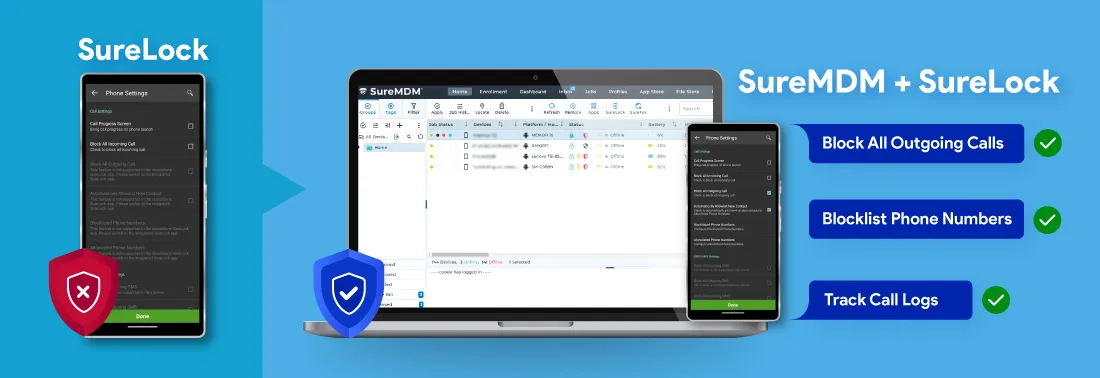
Block All Outgoing Calls:
Admins can block all outgoing calls on managed devices, limiting communication to only incoming calls.Automatically Allowlist New Contact:
New contacts on the device are automatically added to the allowlist, ensuring that they can bypass call restrictions.Blocklisted Phone Numbers:
Admins can block incoming or outgoing calls from selected numbers, even if the device is set to allow all calls.Allowlisted Phone Numbers:
Admins can allow incoming or outgoing calls only from specific numbers while blocking all others.Phone Manager Plugin App:
Admins can create an allowlist of phone numbers, restricting outgoing calls so that users can only call numbers on this list.Call Log Tracking:
Admins can directly view the call history of the managed devices in the SureMDM console.
Who Will be Affected?
For starters, SureLock is available as a standalone application and as part of SureMDM.
The recent policy update will impact only standalone SureLock users who are actively using the deprecated features (mentioned in the previous section) on their devices.
Who Will Not be Affected?
The updated policy will have no impact on the users who are not utilizing any mentioned deprecated features or those who have already migrated to integrated SureLock.
What Options Are Available for Standalone SureLock Users?
If you're currently using the standalone SureLock application and rely on the deprecated features, you'll need to consider the following options:
1. Migrate to Integrated SureLock Solution
For the users who are already using SureMDM, we strongly recommend migrating to the integrated SureLock solution. By migrating, you can ensure uninterrupted access to the deprecated features of standalone SureLock and benefit from enhanced security and management capabilities. There is no cost associated for the users with the migration.
Check the knowledge base article on migrating from standalone SureLock to integrated SureLock
2. Continue with the Last Supported SureLock Version (21.39011)
You can choose to remain on the last supported version of standalone SureLock without updating it to the latest versions. This will not have any impact on your usage and application performance. The updated SureLock application will have the Call Logs permissions disabled automatically and these features will stop working on the devices if you install the updated application.
For users not utilizing any of the deprecated features mentioned above or those who have already migrated to integrated SureLock, you can continue using SureLock without any concerns.
Why Migrate to Integrated SureLock?
Automatic Permission Granting:
All the required permissions for SureLock are inherently granted from SureMDM Agent, eliminating the need for separate permissions.Continued Access to All Features:
Access all the essential features including call logs tracking, allowlist/blocklist of phone numbers, and blocking of outgoing calls with Google's latest security requirements.Enhanced Features:
The integrated solution combines the best of both worlds, providing advanced management capabilities alongside SureLock app lockdown features.Seamless Updates:
Easy to manage regular updates and improvements remotely will ensure your devices remain secure and functional.Continued Support:
Migrating to the integrated solution means you’ll have access to ongoing support and resources as we continue to improve our offerings.No Hidden Costs:
No separate activation cost is required for integrated SureLock.
Next Steps
Don’t wait! If you rely on features related to Call Logs permissions, we recommend completing the migration as soon as possible to ensure uninterrupted access to all features. If you're ready to make the transition or have any questions about the migration process, please don’t hesitate to reach out to our support team. We’re here to assist you every step of the way with minimal impact on your business operations.
Thank you for your continued trust in us. We’re excited to help you enhance your device management experience with the integrated SureLock.