| Applies to: | |
| Product | SureLock/SureFox/SureVideo |
| Platform | Android |
Wondering how to disable that annoying system bottom bar present in Honeycomb (Android 3.0.x), IceCream Sandwich (4.0.x), Jellybean (4.1.x, 4.2.x), KitKat (4.4.x) and Lollipop (5.0.x) devices! Well, SureLock, SureFox and SureVideo come with option to disable the bottom bar in tablets running Android 3.0 or higher.
Disabling bottom bar can be quite helpful in scenarios where complete kiosk lockdown is required and end-users are to be restricted to use of only few allowed functions on the Android phones and tablets.
Once Disable Bottom Bar option in SureLock, SureFox and SureVideo is enabled, it disables all the functionalities present in bottom bar except Back and Home option.
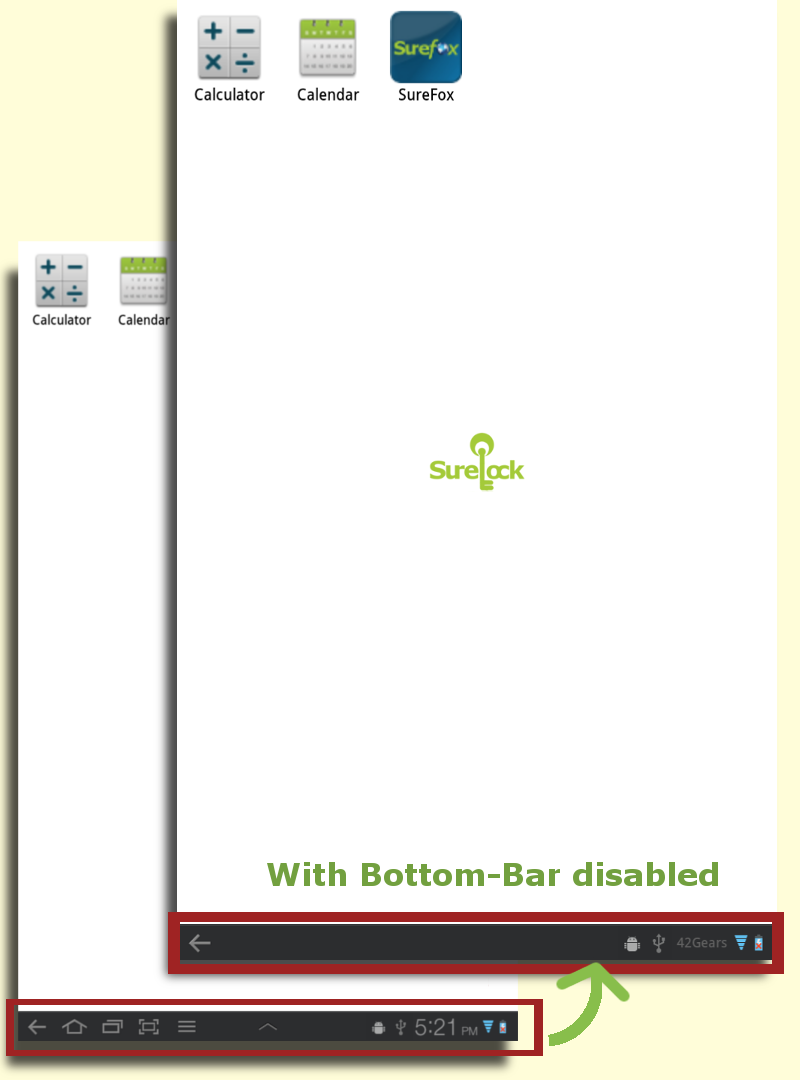
Here's how you can get away with bottom bar:
- Launch SureLock/SureFox/SureVideo on your tablet and access Admin Settings using admin password
- Go to SureLock/SureFox/SureVideo Settings
- Enable Disable Bottom Bar option and click on Done. (There might be a prompt to set it as device administrator to enable this feature)
- Once back to Home Screen, you will notice that all functions except Back and Home are disabled in bottom bar
Note: This feature's behaviour may vary depending on the Android version of the device. Devices with Android Jellybean and KitKat, Disable Bottom Bar option will disable only Recent App button and on ICS devices, both Home and Recent App buttons are disabled.
If you have rooted Android device, click here to know how to hide the bottom bar.
To learn more on how to secure and manage Android and Windows Mobile/CE devices efficiently, visit us at www.42gears.com.
