Disable bottom bar in Android phones and tablets with SureLock, SureFox and SureVideo

By 42Gears Team
Applies to:
Product SureLock/SureFox/SureVideo
Platform Android
Wondering how to disable that annoying system bottom bar present in Honeycomb (Android 3.0.x), IceCreamSandwich (4.0.x), Jellybean (4.1.x, 4.2.x), KitKat (4.4.x) and Lollipop (5.0.x) devices! Well, SureLock, SureFox and SureVideo
Disable Bottom Bar option in SureLock, SureFox and SureVideo is enabled, it disables all the functionalities present in bottom bar except Back and Home
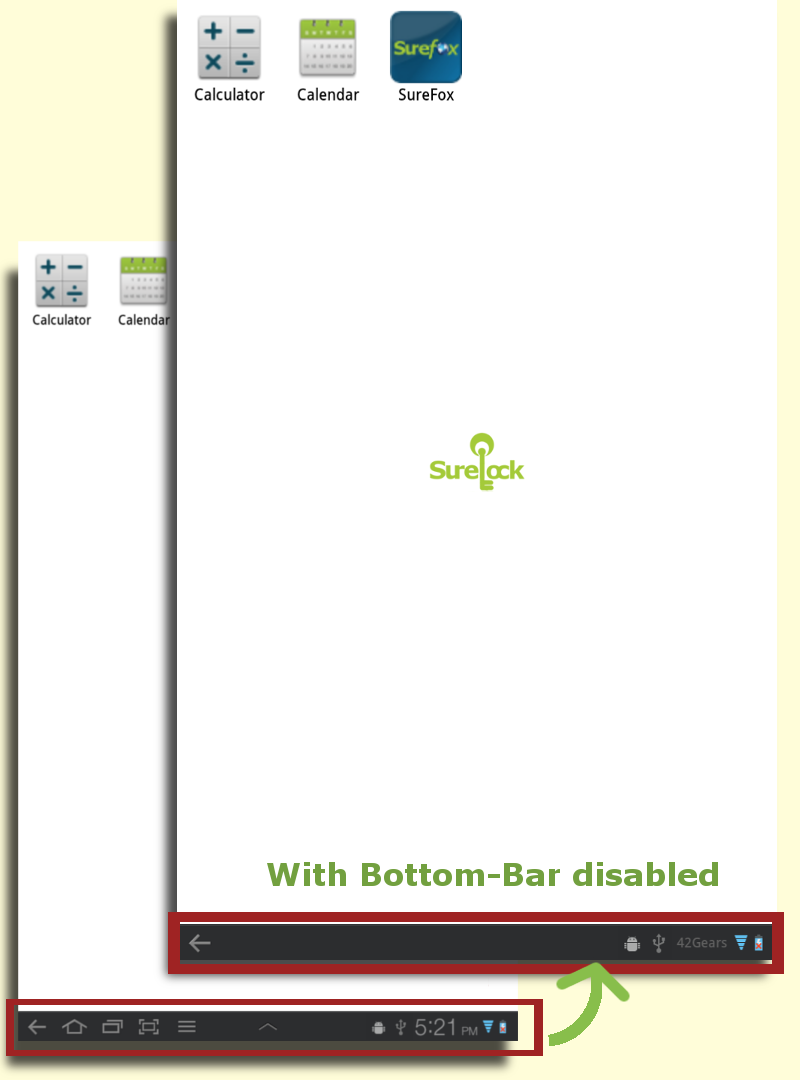
Before & After Disabling Bottom Bar
  • Launch SureLock/SureFox/SureVideo on your tablet and access Admin Settings using admin password
  • Go to SureLock/SureFox/SureVideo Settings
  • Enable Disable Bottom Bar option and click on Done. (There might be a prompt to set it as device administrator to enable this feature)
  • Once back to Home Screen, you will notice that all functions except Back and Home are disabled in bottom bar
Note: This feature's behaviour may vary depending on the Android version of the device. Devices with Android Jellybean and KitKat, Disable Bottom Bar option will disable only Recent App button and on ICS devices, both Home and Recent App buttons are disabled.

“Written with expertise and passion to help you understand the topic better.”

4
42Gears Team – Content Author
Published on: February 28, 2012

Subscribe to our newsletter

Stay updated with the latest news, articles, and resources on enterprise mobility.

Weekly articles
Actionable insights delivered once a week. No noise.
No spam
Your privacy matters. Unsubscribe anytime.