
Keeping iPhones, iPads, and Macs updated is essential for security and compliance, but managing OS updates across a growing fleet can become a repetitive task for IT teams. Admins need to decide which versions to deploy, when to enforce them, and how to roll them out without disrupting users.
SureMDM introduces Automated OS Updates for iOS and macOS, helping administrators automate update rollouts. By combining automation with administrative control, organizations can simplify routine update management while maintaining a consistent approach to device security.
Why Automate Apple OS Updates?
Managing operating system updates across an enterprise fleet involves more than making updates available. IT teams need to determine which versions devices should install, when updates should be deployed, and how to minimize disruption to business operations.
Manual update deployment can create several challenges:
- Time-consuming administration: IT teams may need to repeatedly review updates, initiate deployments, and follow up on devices that have not updated.
- Inconsistent update compliance: Devices may run different operating system versions, making it difficult to maintain an approved OS baseline.
- Operational disruption: Deploying updates across the entire fleet simultaneously may affect business-critical workflows.
- Delayed security updates: Delayed updates can leave devices running versions that lack important security fixes.
Automated OS update management helps address these challenges by establishing update requirements and reducing the need for repetitive manual intervention.
Automated OS Updates in SureMDM
SureMDM introduces automated macOS and iOS update management, allowing administrators to define update requirements and automate deployment through configured policies and deployment rings.
Ring-Based Automated OS Updates
Automating OS updates does not mean deploying every update to every device at once. A ring-based approach allows organizations to progressively roll out updates, giving IT teams an opportunity to validate updates before expanding deployment.
How Ring-Based Update Deployment Works
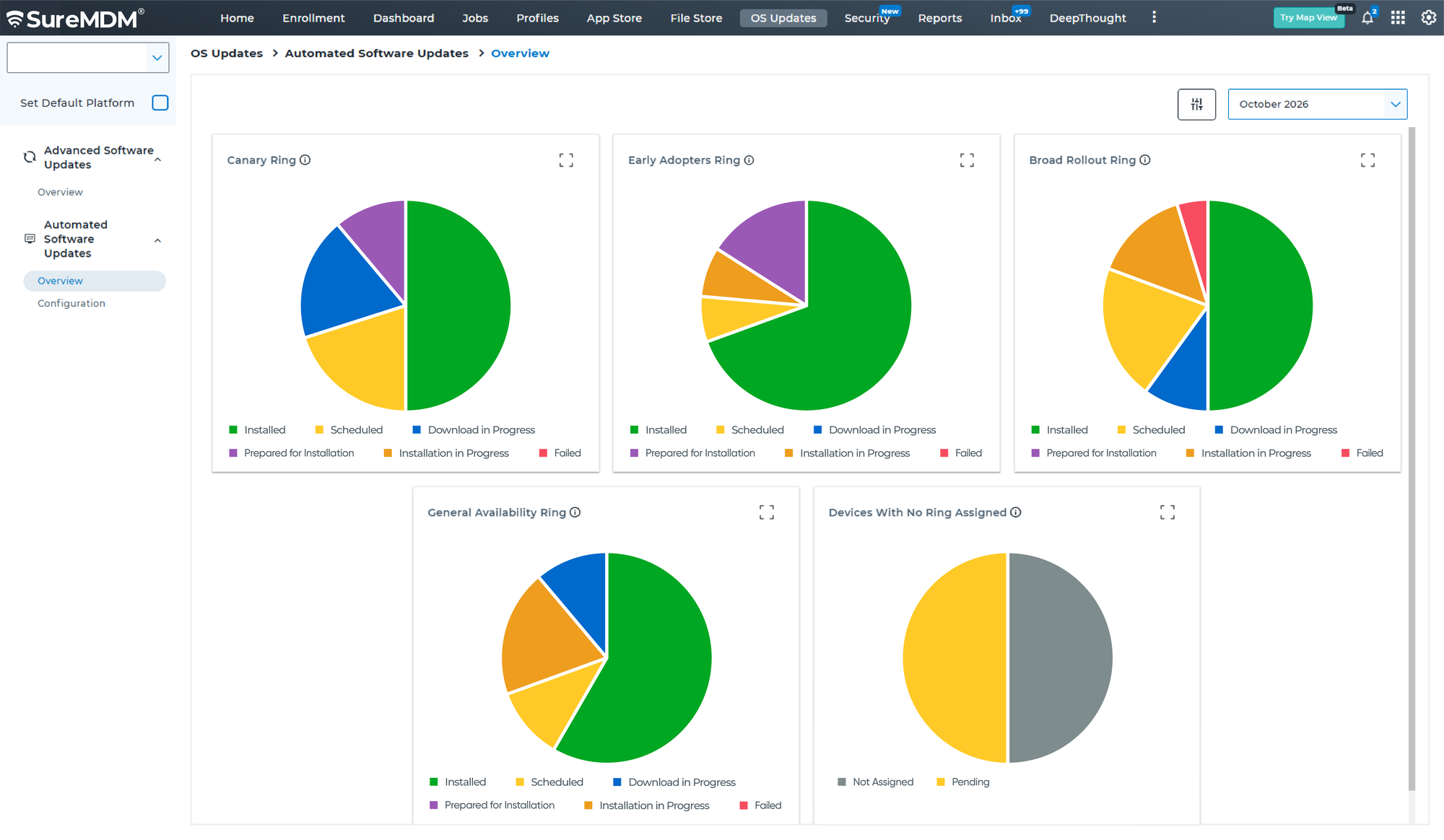
SureMDM provides predefined update rings with update settings and deferral periods configured based on IT best practices. Admins can review these configurations and assign them to devices, simplifying the setup of a staged OS update rollout.
For example, an organization with 1,000 Apple devices could structure its update rollout across four rings:
- Canary ring — IT devices: 50 devices used by the IT team for initial testing. Updates are deployed first to validate installation behavior and identify potential compatibility issues.
- Pilot ring — Pilot users: 150 devices across different departments and configurations. This expands testing to a broader range of users, devices, and business applications.
- Broad rollout — General users: 600 devices across the wider workforce. Once the update is validated, deployment expands to the broader fleet according to the defined update policy and schedule.
- Final ring — Business critical devices: 200 devices supporting business-critical operations. These devices receive the update after sufficient validation, minimizing the risk of disrupting critical workflows.
Beyond the predefined rings, organizations can create custom rings to meet specific operational requirements and gain greater flexibility over OS update deployment. Admins can configure update settings and deferral periods for different device groups based on compatibility requirements, business priorities, and preferred rollout schedules. This flexibility helps IT teams balance timely OS updates with user productivity and business continuity.
Configure macOS and iOS Update Requirements
Different organizations have different update management needs. Some want devices to install the latest available release, while others need to maintain a specific version or allow a limited delay before enforcing minor updates.
SureMDM provides update targeting options to help administrators define these requirements.
1. Latest Available OS Update
Automatically targets the latest macOS and iOS update released by Apple. Devices are required to install the most recent available version according to the configured enforcement schedule.
Use case: Organizations that want to keep managed devices aligned with the latest available release without manually selecting a version for every update cycle.
2. Specific Update Version
Administrators can select a specific OS version that devices must install to remain compliant.
Use case: Businesses that need to maintain an approved operating system baseline while validating newer releases for application compatibility or internal requirements.
3. N-Version Approach
Enforcing the latest OS version immediately may leave IT teams with limited time to validate updates for compatibility with business applications and existing workflows. The N-Version approach offers more flexibility by allowing devices to remain a defined number of minor releases behind the latest version before an update is enforced.
Use case: Organizations can adopt an N-1 approach, a common update management practice, to allow time for compatibility testing while ensuring devices stay reasonably up to date.
The allowed version lag setting applies only to minor update enforcement, not all OS update types.
Benefits of Automated OS Update Management With SureMDM
Automated OS update management helps organizations simplify routine maintenance while retaining control over update requirements.
- Reduce administrative effort: Automate routine update deployment and minimize repetitive IT tasks.
- Improve update compliance: Establish update requirements and enforcement schedules across managed devices.
- Minimize disruption: Roll out updates progressively instead of updating the entire fleet simultaneously.
- Maintain update flexibility: Target the latest available update, a specific version, or an allowed version lag for minor updates.
- Support security requirements: Help keep devices aligned with approved OS versions and security expectations.
Simplify Apple Update Management With SureMDM
As Apple device fleets grow, manually coordinating OS updates can make it increasingly difficult to maintain consistent update requirements while minimizing administrative effort.
Automated OS Updates in SureMDM help simplify macOS and iOS update management through configurable update targeting, enforcement schedules, and ring-based deployment.
By combining predefined update rings with customizable deployment options, organizations can roll out Apple OS updates in controlled stages while adapting update settings and deferral periods to their needs. This flexibility helps IT teams streamline deployments, validate updates before wider rollout, and maintain compliance across their managed Apple fleets.