🚧 Page Under Maintenance

Some sections are currently being updated. Content mapping is in progress and will be available soon.

Device Fencing

Every device has a job. Fencing makes sure it stays where that job is.

Geofencing, time fencing, and network fencing – built into SureMDM so managed devices only work where, when, and on the networks you allow. No blind spots. No bolt-on tools. Book a Demo
Talk to Sales→
fencing-for-mdm

Once a device leaves your sight, it’s basically on its own

You provision it, secure it, hand it over – and then what? Without fencing, a “managed” device is only managed on paper. It can be used anywhere, anytime, on any network – and you won’t know until something goes wrong.

Location No location accountability

A device could be at a client site, in someone’s car, or three states away – your console has no way to flag it, let alone act on it. Stat: Over 90% of security incidents involving lost or stolen devices result in an unauthorized data breach.

Location

Time No time-based control

Shift ends, store closes, kiosk should go idle – without time rules, devices stay wide open around the clock, waiting for someone to remember to lock them. Stat: 43% of remote and distributed employees reported at least one IT security incident in the past 12 months.

Time

Network Unsecured network exposure

A device that can connect to any WiFi is a device that can leak data over any WiFi – coffee shop, airport, or a network you’ve never heard of. Stat: 74% of enterprise IT leaders say their company has suffered a breach tied to mobile security gaps.

Network

Visibility Shadow usage IT finds out last

 Employees move files, install apps, and use devices in ways policy never approved – and by the time IT notices, it’s already a cleanup job. Stat: 75% of employee technology use is projected to happen outside IT’s visibility by 2027, up from 41% in 2022.

Visibility

What is device fencing, really?

Device fencing is a set of MDM rules that draw a boundary around how a managed device is allowed to behave – where it can be, when it can be used, and which networks it can connect to. Cross the boundary, and the device responds automatically – lock, alert, restrict, or wipe, depending on the policy you set. It’s the difference between watching a device and actually controlling it. None of this is really a “device” problem. It’s a boundary problem – and boundaries are exactly what fencing solves. Also searched as: geofencing for business devices · MDM geofencing · time-based device restriction · network-based access control Geofencing: Circular & polygonal geofencing
  • Circular: Drop a pin, set a radius. Fast to configure for a single site – a warehouse, a branch office, a retail store.
  • Polygonal: Draw a custom-shaped boundary that follows the real geography – a campus outline, a delivery zone, a restricted floor. Real estate isn’t a circle, so your fence doesn’t have to be either.


Result: Device enters or exits the zone → auto-lock, alert admin, or restrict apps, instantly.
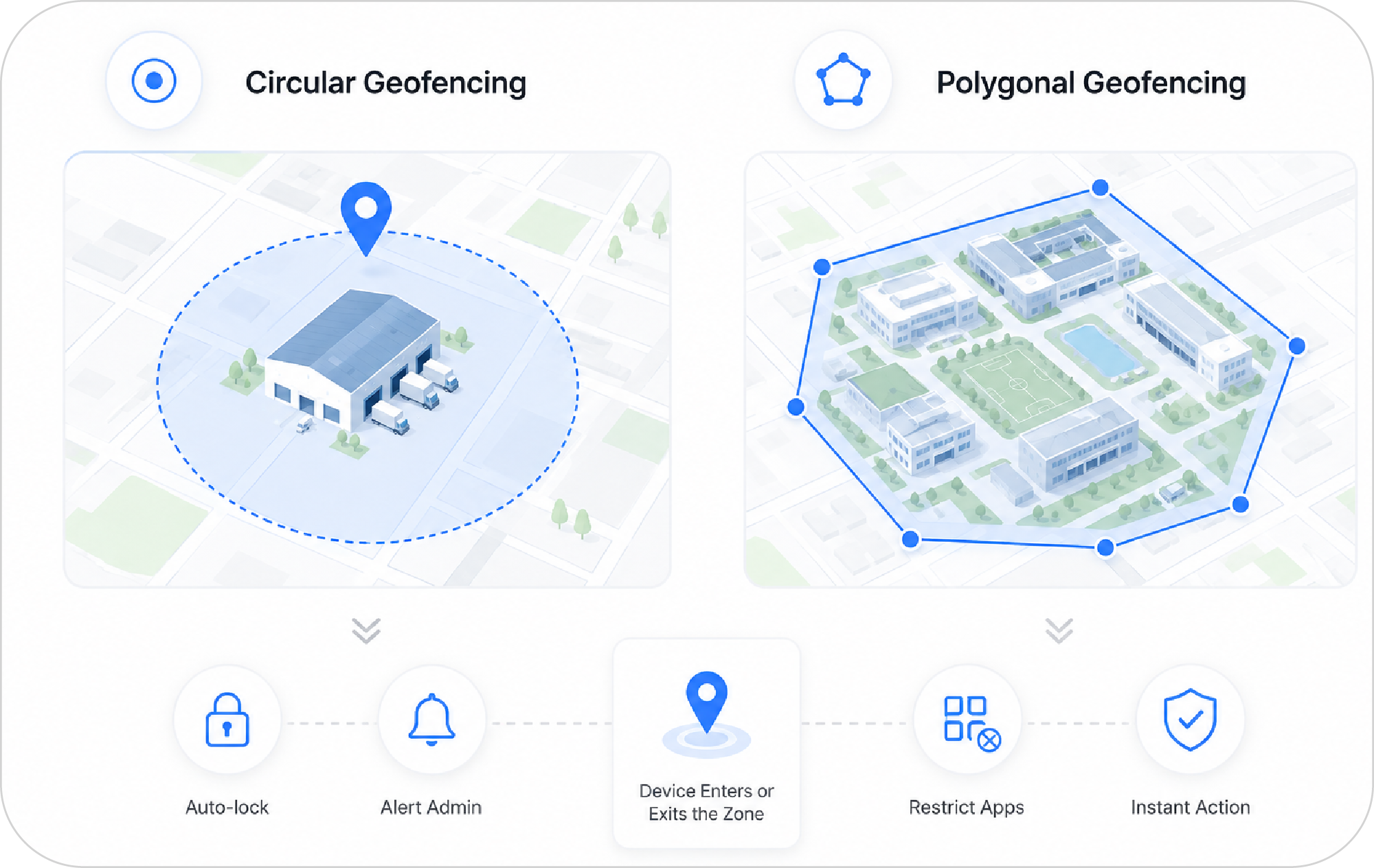
geofencing-circular-and-polygonal
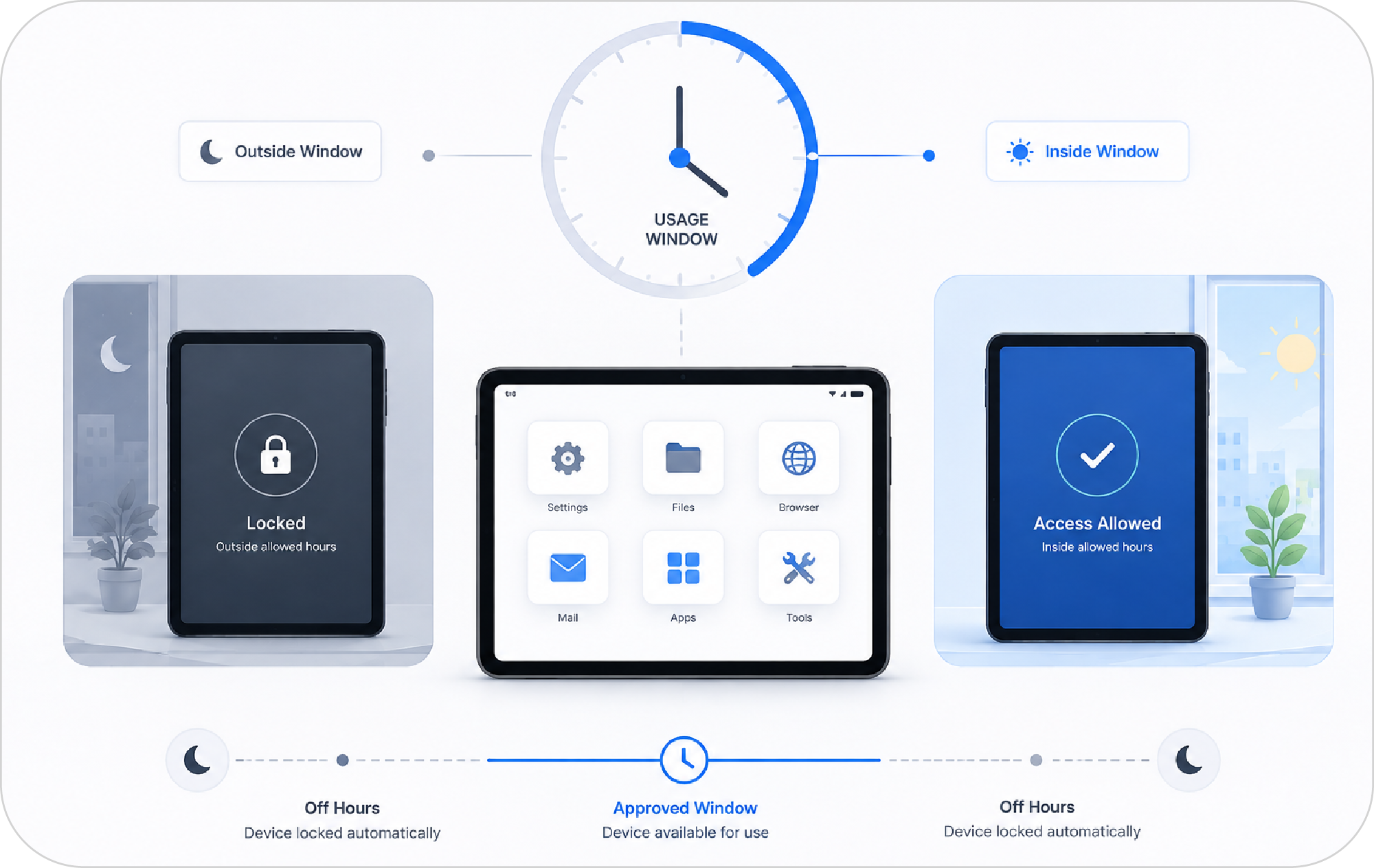
time-fencing-using-devices-in-specified-time
Time Fencing: Usage windows that enforce themselves
  • Set the window: Define exactly when a device is allowed to work – business hours for office devices, shift windows for retail, scheduled access for shared kiosks.
  • Let it run itself: Outside the approved window, the device locks down on its own. No admin has to remember to do it at 6 PM on a Friday.


Result: Devices are only usable during the hours you define – automatically, every day.
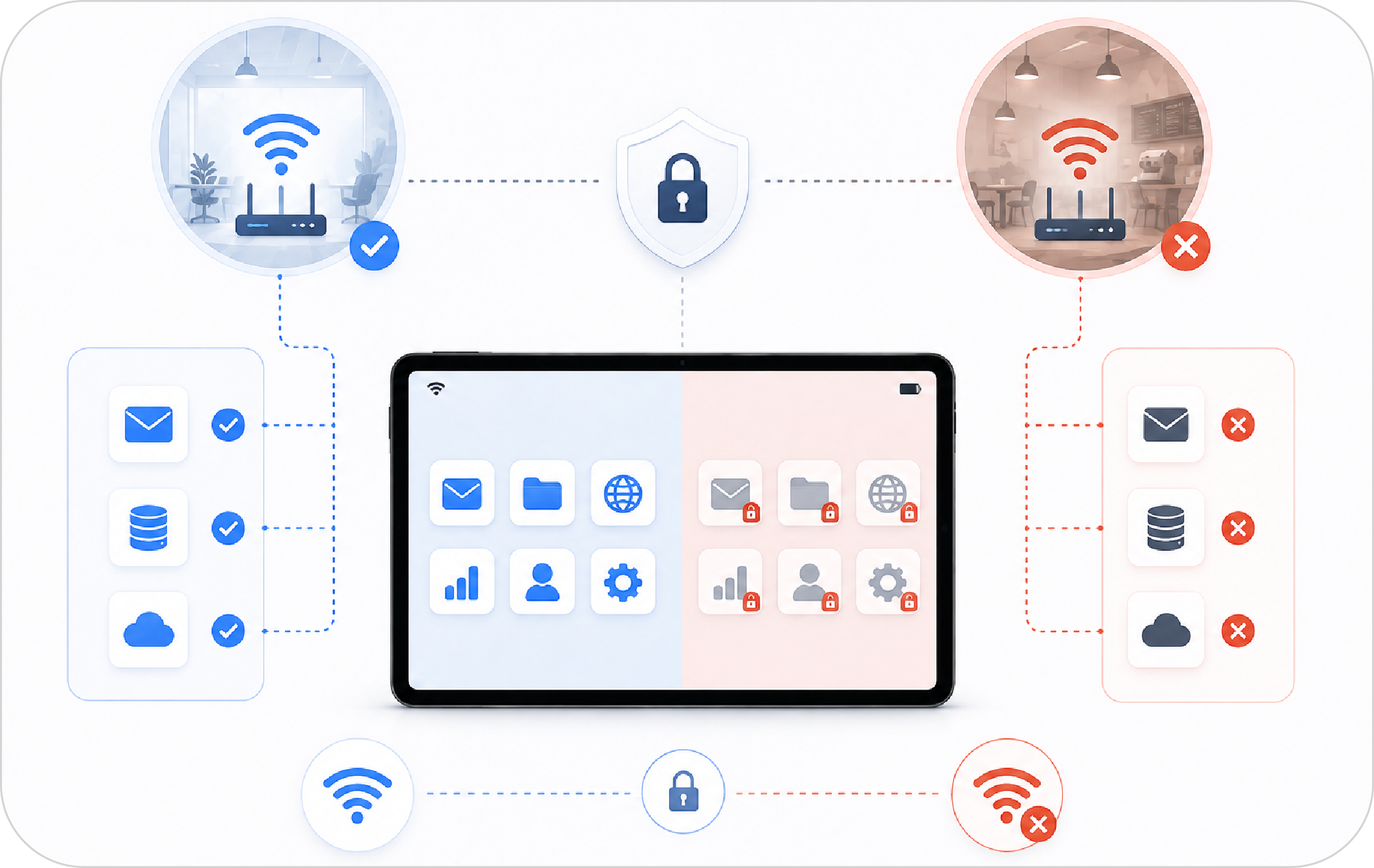
Network Fencing Tie functionality to approved networks
  • Inside the corporate network: The device works exactly as intended, with full access to the apps and data it needs.
  • Outside the approved SSIDs: SureMDM restricts what the device can do the moment it connects to public or unapproved WiFi – because most data leaks don’t happen at the office, they happen at the coffee shop.


Result: Device access follows the network it’s on, not just the person holding it.
network-fencing-run-devices-on-only-approved-networks

Most MDMs give you a map pin. SureMDM gives you control.

SureMDM doesn’t make you pick one type of fencing. Set all three together, or independently, per device group – from the same dashboard you already use to manage the fleet.

Typical MDM Tool SureMDM
Geofencing only, often as a bolt-on add-on Geofencing + time fencing + network fencing, native and combined
Circular radius zones only Circular and polygonal zones, so the fence matches the real boundary
Alerts you after a violation already happened Real-time enforcement – lock, restrict, or wipe automatically
Built primarily for phones Works across Android, Windows, and rugged/dedicated devices
Cloud-only, one-size deployment Cloud or on-premise, for teams that keep location data in-house

Questions IT admins usually ask

What is device fencing in MDM?

Device fencing is a way to set virtual boundaries – by location, time, or network – around a managed device, so it automatically responds when it crosses one. It’s a core capability of mobile device management (MDM) software like SureMDM, used to enforce policy without manual intervention.

What’s the difference between circular and polygonal geofencing?

Circular geofencing sets a boundary as a radius around a single point – quick to configure for one site. Polygonal geofencing lets you draw a custom-shaped boundary that follows the actual geography of a location, like a campus, warehouse complex, or delivery zone, giving you a far more accurate fence than a simple circle.

Can I set different fencing rules for different groups of devices?

Yes. SureMDM applies geofencing, time fencing, and network fencing at the device-group level, so retail devices, field devices, and office devices can each follow their own rules from the same console.

Does location fencing still work if the device is offline?

Location-based enforcement depends on the device’s location services being active. SureMDM lets admins configure fallback behavior for when location access is off or connectivity drops, so a device doesn’t end up unmanaged in either case. 

Will fencing drain the device’s battery?

SureMDM checks location, time, and network conditions efficiently in the background, so day-to-day fencing shouldn’t noticeably impact battery life on supported devices. 

Can SureMDM restrict a device to only work on office WiFi?

Yes – that’s network fencing. You approve specific SSIDs, and SureMDM restricts device functionality, or locks the device entirely, the moment it connects to any network outside that approved list.

Is device fencing available for Android, iOS, Windows, macOS?

SureMDM’s fencing capabilities are built to work across the device types most enterprises manage – Android, Windows, and rugged or dedicated hardware – with exact feature support varying by OS. 

How is SureMDM’s fencing different from other MDM tools?

Most MDM tools treat geofencing as a single, basic feature. SureMDM combines geofencing (circular and polygonal), time fencing, and network fencing in one console, with real-time enforcement – not just after-the-fact alerts.

Give every device a boundary it can’t cross.

See how geofencing, time fencing, and network fencing work together inside SureMDM.

Start Free Trial