Centralized BIOS Management for Windows Devices
Secure, configure, and monitor supported BIOS settings across your Windows fleet with SureMDM.
What is BIOS and Why Does it Matter?
BIOS (Basic Input/Output System) is the firmware layer that initializes hardware and starts the operating system when a device powers on. BIOS settings sit beneath the operating system and control critical security and hardware configurations.
But managing BIOS across hundreds or thousands of Windows devices is another challenge. Managing OS settings and applications is only half the battle. Critical security and configuration controls also exist at the BIOS/UEFI level. Yet, managing these settings across a large Windows fleet can be difficult when IT teams rely on manual processes or vendor-specific tools.
Why Enterprises Need Centralized BIOS Management
Managing OS settings and applications is only half the battle. Critical security and configuration controls also exist at the BIOS/UEFI level. Yet, managing these settings across a large Windows fleet can be difficult when IT teams rely on manual processes or vendor-specific tools.
1
Inconsistent Security Configurations
Different BIOS settings across devices can make it difficult to maintain standardized security baselines, enforce trusted startup configurations, and ensure every endpoint meets organizational requirements.
2
Manual Management at Scale
Configuring BIOS settings device by device takes significant IT time and often requires physical access or OEM-specific utilities—making large-scale deployments slow and difficult to manage remotely.
3
Complex Vendor and Device Variations
BIOS settings and capabilities can vary by device model, manufacturer, and firmware version. Managing these differences with multiple OEM tools can increase administrative complexity and make it harder to maintain consistent configurations across the fleet.
4
Unauthorized BIOS Changes
Uncontrolled access to BIOS settings can allow users or unauthorized parties to modify critical configurations, potentially weakening device security and creating compliance challenges.
How SureMDM Manages BIOS Across Devices
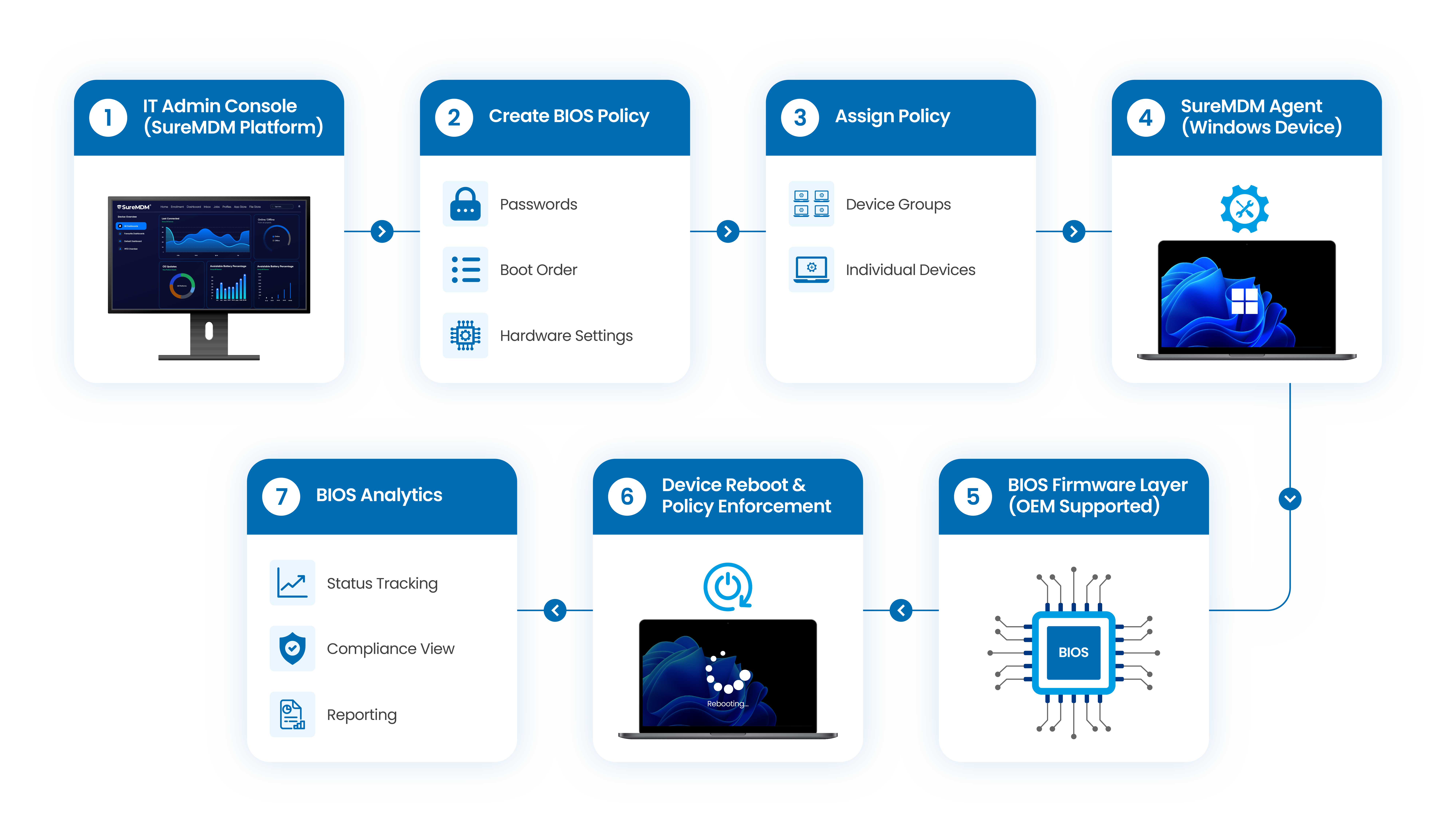
Everything You Need for Centralized BIOS Management
Manage, deploy, monitor, and analyze supported BIOS configurations from a single SureMDM console| Capability | What You Can Do |
|---|---|
| Centralized Management | Manage supported BIOS settings from a single console |
| Policy Creation | Build reusable BIOS configuration profiles |
| Password Management | Manage supported BIOS supervisor passwords |
| Boot Management | Configure and manage boot order settings |
| Hardware Settings | Configure supported BIOS-level hardware controls |
| Remote Deployment | Apply BIOS configurations to individual devices or device groups |
| Status Monitoring | Track BIOS configuration and deployment status |
| BIOS Analytics | View, search, filter, and export BIOS configuration data across managed devices |
BIOS Analytics: Visibility Beyond Configuration
Managing BIOS is only part of the equation—visibility is equally important.
With SureMDM BIOS Analytics, IT teams can understand With SureMDM BIOS Analytics, IT teams can see what BIOS settings are already configured across their Windows fleet from the moment devices enroll.
Administrators can:
- View current BIOS configuration values across devices
- Search and filter devices by BIOS attributes
- Compare BIOS settings across groups or locations
- Identify non-compliant or misconfigured devices
- Filter BIOS data by OEM or device model
- Export BIOS reports in CSV format for audits and compliance reviews
Move from blind configuration to Centralized BIOS visibility.
Why Choose SureMDM for BIOS Management?

Strengthen Endpoint Security
Protect critical firmware-level configurations and reduce unauthorized changes

Reduce IT Effort
Replace repetitive device-by-device BIOS configuration with centralized management.

Improve Fleet Visibility
Know how BIOS settings are configured across your managed Windows devices.

Simplify Compliance
Standardize configurations and maintain visibility into administrative changes.

Scale with Your Windows Fleet
Apply BIOS policies across supported devices and device groups as your fleet grows.
Manage Windows Devices from the OS to the BIOS
Don't let BIOS become a blind spot in your endpoint management strategy.
With SureMDM BIOS Management, IT teams can centrally configure and monitor supported BIOS settings while managing their Windows device fleet from a single platform.
FAQs:
Find answers to common questions about our service.