
Picture a warehouse full of Zebra printers, with an admin entering IP addresses one by one. One typo can derail an enrollment. Multiply that by ten, fifty, or a hundred printers, and a simple setup task becomes a time-consuming process.
That's where Network Printer Discovery comes in. With the new capability in SureMDM, admins can scan their network, see available Zebra printers, review key device details, and select the printers they want to enroll — without manually entering every IP address.
Let's look at how Zebra printer enrollment works now, what's new, and what it means for Zebra printer management going forward.
Why Zebra Printer Enrollment Needed an Upgrade
Until now, SureMDM supported two ways to handle Zebra printer enrollment:
- Manually entering printer IP addresses
- Using pre-configured NRD files
Both methods work, but they require admins to know which printers are available and have their IP addresses or NRD files ready. Previously, SureMDM didn't provide network scanning directly within the enrollment workflow to identify available, unenrolled Zebra printers.
For organizations managing a handful of printers, this may not be a major concern. But across retail stores, warehouses, and field locations, manually entering IP addresses can quickly become time-consuming and prone to errors.
Network Printer Discovery removes that guesswork. Admins can scan the network, view available Zebra printers and their details, select the printers they want, and enroll them without manually entering each IP address.
What's New: Three Ways to Enroll Zebra Printers
SureMDM's Zebra printer enrollment screen now has three clearly labeled options, each in its own accordion:
- Printer Enrollment Tool — enroll using known IP addresses
- Network Printer Discovery — scan the network and pick printers to enroll
- NRD File Deployment — enroll using pre-configured NRD files
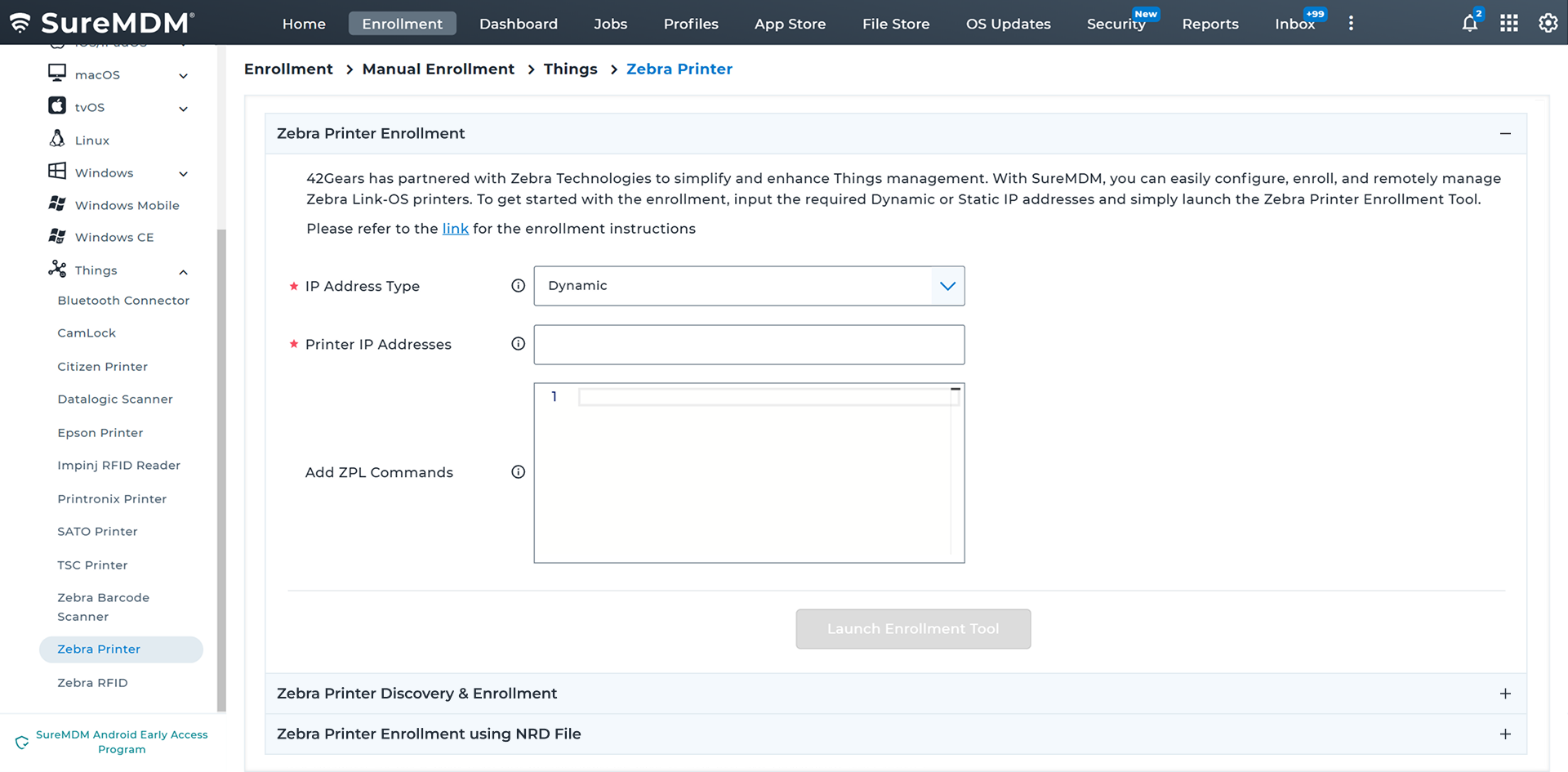
This blog focuses on the new option: Network Printer Discovery.
How Network Printer Discovery Works With SureMDM
Follow these simple steps to discover and enroll Zebra printers on your network.
Step 1: Open Zebra Printer Enrollment
Step 2: Select Network Printer Discovery
Step 3: Launch the Enrollment Tool
Step 4: Discover Printers
Step 5: Select Printers
Step 6: Add Printers
Step 7: Track Enrollment
Want to learn more about Zebra printer enrollment? Explore the complete Zebra Printer Enrollment guide.
Once enrollment finishes, your printers appear in the SureMDM Console, ready to manage like any other endpoint in your device management setup. Once enrolled, you can continue managing printers as usual, including monitoring status, pushing firmware, and sending ZPL commands.
Keeping the Printer Enrollment Tool Up to Date
If an older version of the Printer Enrollment Tool is installed, SureMDM prompts you to update it when you launch the tool. The latest version uses HTTPS by default, and HTTP is no longer supported.
Why Network Printer Discovery Matters for IT Admins
Network Printer Discovery isn't just a shortcut. It changes how Zebra printer enrollment fits into daily IT work, and it strengthens SureMDM's position among printer management software options. Key benefits include:
- Less Manual Effort — No more typing IP addresses one at a time.
- Network Discovery — Discover available Zebra printers on your network before you enroll a single one.
- Faster Large Scale Rollouts — Enroll multiple printers in one pass instead of repeating the same manual steps.
- Built-in Automation — Run ZPL commands automatically right after enrollment, saving a separate configuration step.
- Better Zebra Printer Management From Day One — Discovered printer details can be captured during enrollment, reducing errors caused by manually entering device information.
For organizations managing Zebra printers across stores, warehouses, or service locations, this adds up to real time saved every time a new printer goes live. It's also one more reason SureMDM works well as a single device management platform, instead of running separate printer management software alongside your regular device management tools.
Wrapping Up
Network Printer Discovery takes the guesswork out of Zebra printer enrollment. IT admins can discover available printers, review device details, select multiple printers, and track enrollment from a single workflow.
With Printer Enrollment Tool and NRD File Deployment still available, SureMDM gives IT teams multiple ways to onboard Zebra printers based on their deployment environment.