
How much time does your IT team spend resetting and preparing iPhones or iPads after troubleshooting, testing, temporary usage, or employee transitions?
What happens when devices need to be wiped and quickly restored with the right apps, security policies, settings and configurations again?
For many organizations, this process is still manual, repetitive, and time-consuming.
IT administrators often need to:
- Erase device data
- Reconfigure settings
- Reinstall business applications
- Apply security policies
- Re-enroll devices into management systems
Doing this repeatedly across multiple devices can slow down operations and increase IT workload.
That’s where Return to Service becomes valuable.
In this blog, we’ll explore what Return to Service for iOS is, how it works, its benefits, and why businesses are increasingly adopting automated device reset workflows.
What Is Return to Service for iOS?
Return to Service is a Mobile Device Management (MDM) feature that automates the process of resetting and reprovisioning iOS devices, helping organizations quickly prepare devices for the next users (to a predefined operational state) with minimal manual effort.
Rather than spending time reconfiguring devices after every reset, IT administrators can automate key setup tasks such as:
- Erasing device data
- Applying configurations
- Installing business apps
- Enforcing security policies
- Skipping Wi-Fi, language, and region selection screens
- Preserving apps for a seamless return-to-service experience
The device automatically returns to a ready-to-use business state after the reset process completes.
This helps organizations:
- Reduce manual IT effort
- Speed up device preparation
- Maintain security standards
- Ensure configuration consistency
Implementing Return to Service for iOS Using SureMDM
Here are the steps to implement iOS Return to Service Using SureMDM for Automated Device Enrollment Enrolled Devices
- Navigate to SureMDM Web Console > Jobs > New Job > iOS/iPadOS > Device Actions.
- Enter a Job Name and select Wipe as the Action Type.
- Choose Automated Device Enrollment and Full Wipe.
- Enable the Return to Service option.
- Select Wi-Fi Profile
- Enable Re-enroll to SureMDM and Preserve Managed Apps
- Save the job and deploy it to the required devices.
Here is how it looks on your SureMDM Console:
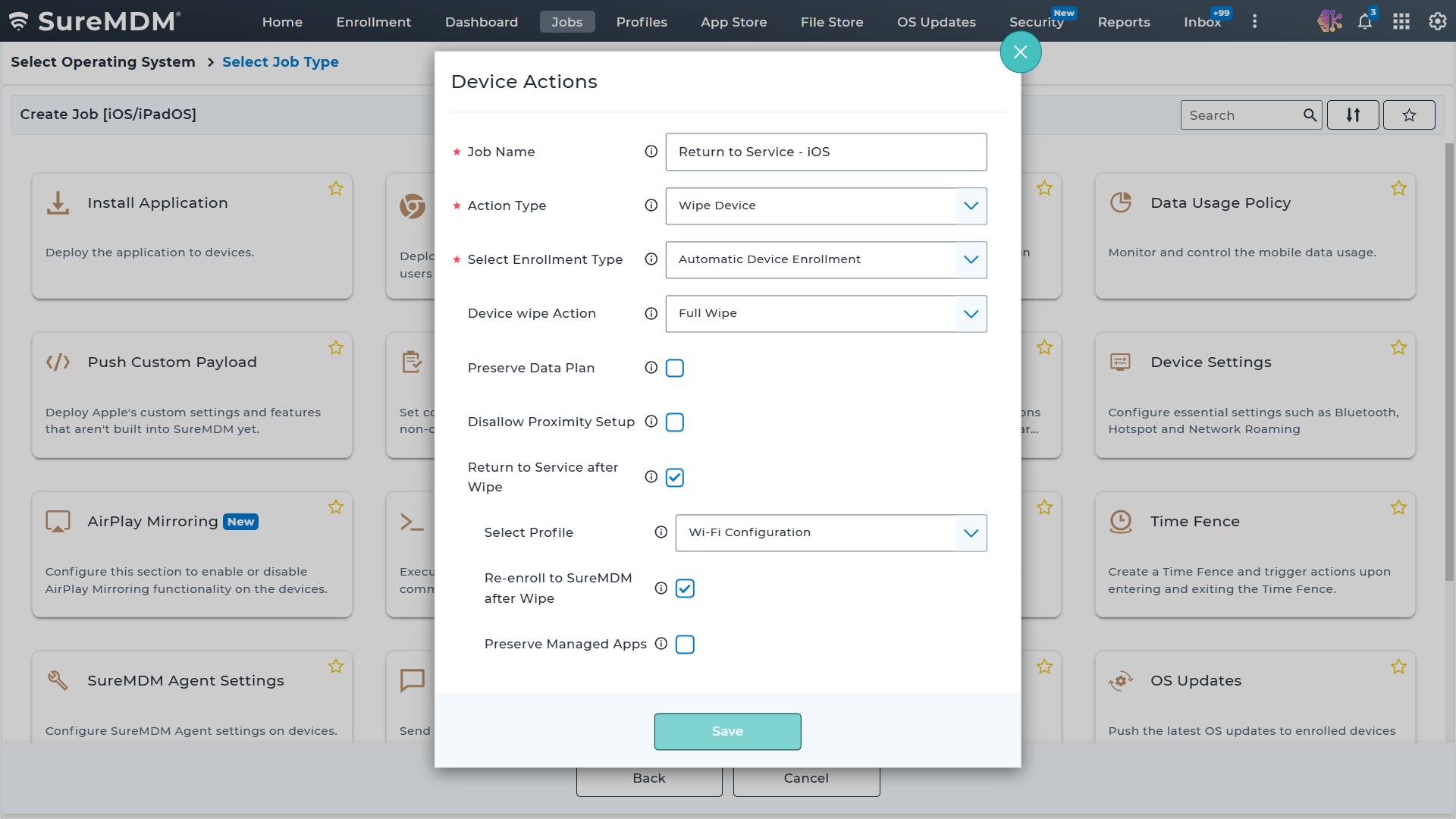
iOS Return to Service Using SureMDM for Devices Enrolled via Automated Device Enrollment
Note:
- Depending on the configuration, devices can automatically reconnect to the network and re-enroll into the management platform after a reset. When the Preserve Managed Apps option is enabled, managed applications and their associated data are restored, allowing devices to complete the setup process with minimal or no user intervention.
- For ADE-enrolled devices, admins can either re-enroll devices into the same SureMDM instance or migrate them to a different MDM instance. Return to Service supports both iOS device reenrollment based on the MDM server mapping in Apple Business Manager (ABM) and direct device reenrollment into SureMDM, providing flexibility based on organizational requirements.
Here are the steps to implement iOS Return to Service Using SureMDM for Device Enrollment Enrolled Devices
- Navigate to SureMDM Web Console > Jobs > New Job > iOS/iPadOS > Device Actions.
- Enter a Job Name and select Wipe as the Action Type.
- Choose Device Enrollment and Full Wipe.
- Enable the Re-enroll to SureMDM after Wipe.
- Select Wi-Fi Profile
Here is how it looks on your SureMDM Console:
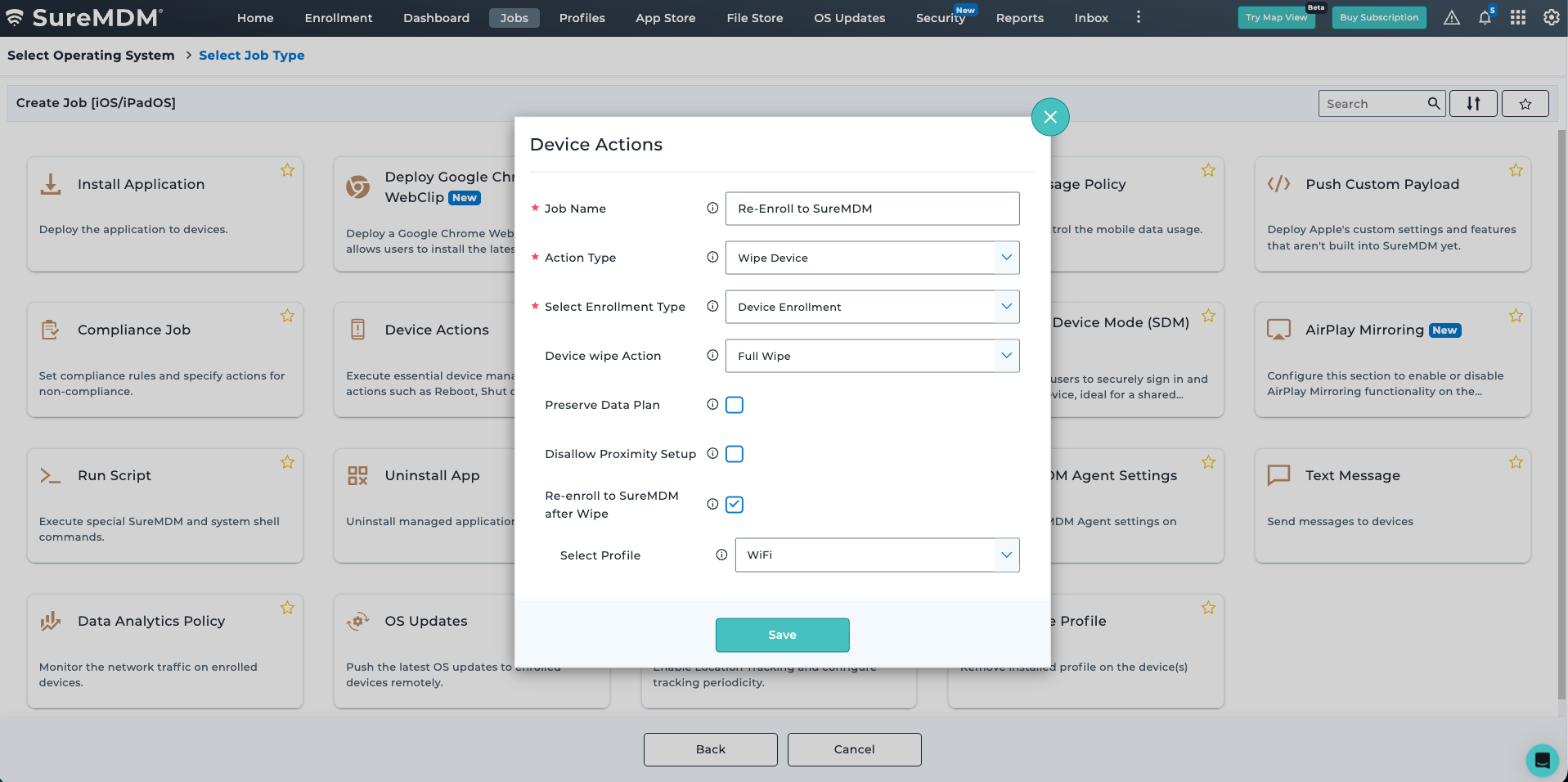
iOS Return to Service Using SureMDM for Devices Enrolled via Device Enrollment
Note: For devices enrolled via Device Enrollment, Return to Service allows the device to be re-enrolled only into the existing SureMDM instance. iOS device reenrollment into a different MDM instance is not supported.
Learn more on how to implement Return to Service for iOS
Key Benefits of Return to Service for iOS
- Reduced IT Workload
Automates repetitive device setup tasks, allowing IT teams to focus on higher-priority activities.
- Faster Device Readiness
Resets and prepares devices for reuse much faster than manual provisioning processes. SureMDM supports Return to Service for devices enrolled via Device Enrollment and Automated Device Enrollment (ADE), so that they can be enrolled back to the same instance.
- Consistent Configurations
Ensures every device receives the same approved policies, apps, restrictions, and network settings for standardized management.
- Improved Security
Removes residual data, reapplies security policies, maintains compliance, and reduces configuration errors.
- Simplified Device Lifecycle Management
Makes it easier to reassign, repurpose, troubleshoot, and refresh devices with minimal manual effort.
Common Use Cases for Return to Service
Organizations use Return to Service for various operational scenarios, including:
- Employee Onboarding and Offboarding
Devices can be quickly reset and reprovisioned for new employees.
- Troubleshooting and Device Recovery
IT administrators can restore devices to a clean operational state when resolving technical issues.
- Temporary Device Allocation
Devices used temporarily for projects, training, events, or field operations can be reset automatically afterward.
- Device Repurposing
Organizations can easily prepare devices for different departments or business functions.
- Compliance and Security Maintenance
Automated resets help ensure devices always operate with approved configurations and updated policies.
Final Thoughts
As organizations continue managing larger fleets of iPhones and iPads, manual reset and provisioning processes become increasingly inefficient. By combining automated resets with modern Apple device management solutions like SureMDM, businesses can maintain consistent device configurations while simplifying day-to-day IT operations.
For organizations looking to improve operational efficiency and streamline iOS device management, Return to Service is becoming an essential capability in modern endpoint management strategies.