
When organizations evaluate a mobile device management solution, trial licenses play a critical role. They give teams the opportunity to explore features, test workflows, and determine whether the platform fits their operational needs.
However, managing trial licenses isn’t always straightforward for MSPs. Sometimes administrators need to extend a trial so customers have more time to evaluate the product, while in other cases, they may need to adjust license allocations or shorten the trial period to maintain proper control.
To make this process simple and flexible, SureMDM Hub offers the Manage Trial Expiry feature. This capability allows administrators to easily modify trial license settings—either by reducing the trial duration or extending the validity period—while maintaining structured oversight and transparency.
What Is the Manage Trial Expiry Feature?
The Manage Trial Expiry modal enables MSPs to adjust the trial license configuration of a customer account.
It provides flexibility to:
- Modify the trial license validity period
- Adjust allocated trial licenses
- Maintain controlled management of evaluation accounts
The feature supports two main actions:
- Reduce Trial Expiry
- Extend Trial Expiry
Each action is designed to help administrators manage trials responsibly while ensuring transparency and proper license allocation.
Reduce Trial Expiry
The Reduce Trial Expiry option allows MSPs to shorten the trial period before the trial expires.
This is useful when:
- The trial allocation needs to be reduced to streamline the billing process
- Ideal for smaller POC projects where shorter evaluation cycles are needed
How to Reduce Trial Expiry?
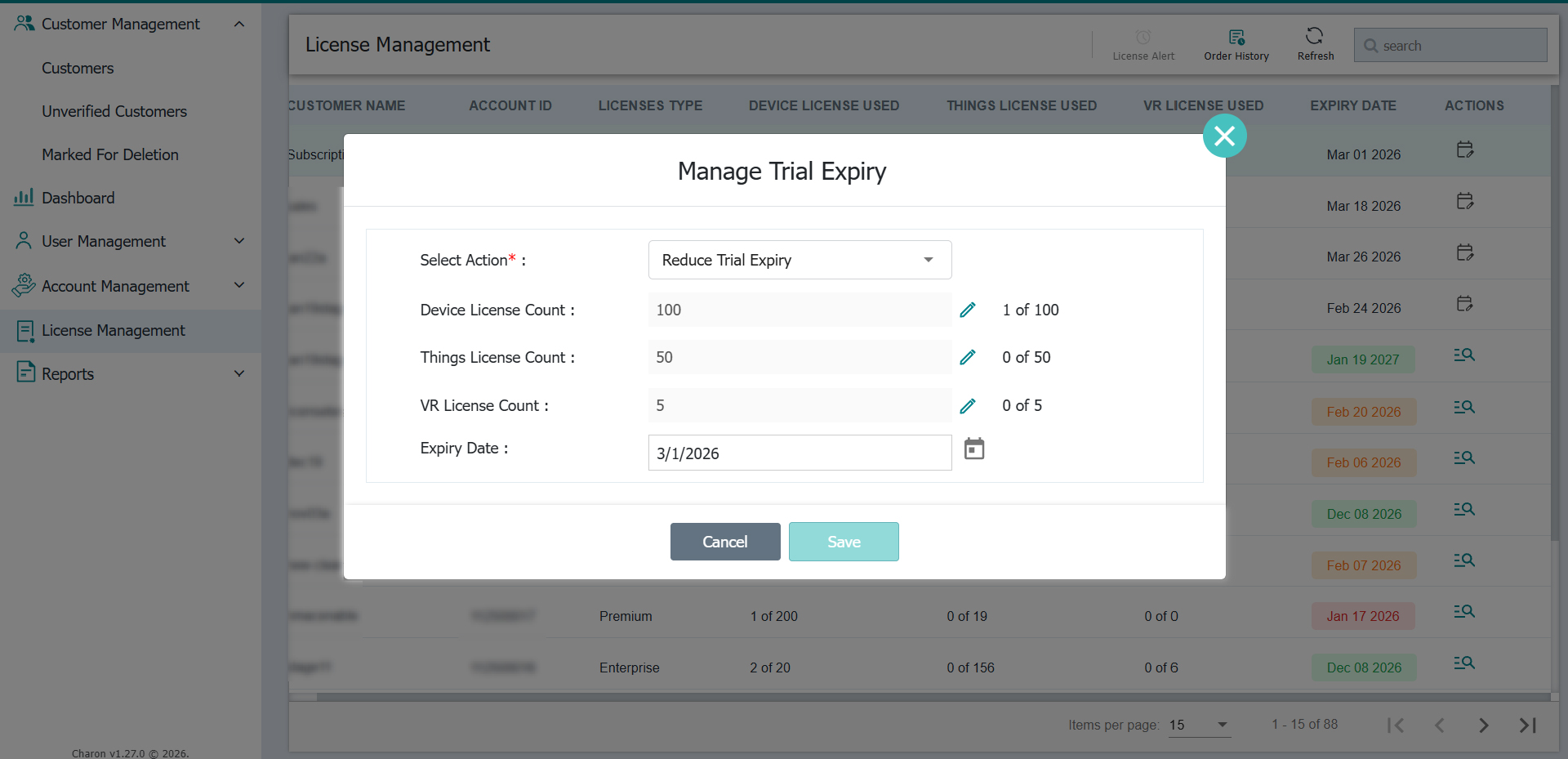
Step 1: Select Action
Select Reduce Trial Expiry from the dropdown menu
Step 2: Specify the License Counts
Specify the required number of Device licenses, Things trial licenses, and VR trial licenses in their respective fields.
Step 3: Select Expiry Date
Use the date picker to choose the new expiry date
Note: Follow the License Limits
While updating the values, ensure they stay within the allowed limits:
- Device License: Maximum 100
- Things License: Maximum 50
- VR License: Maximum 5
This is how it looks on your SureMDM Hub console:
Extend Trial Expiry
In some situations, customers may need additional time to evaluate the platform. The Extend Trial Expiry option allows MSPs to extend the validity of a customer’s trial license.This ensures potential customers have sufficient time to fully test features and make informed decisions.
How to Extend Trial Expiry?
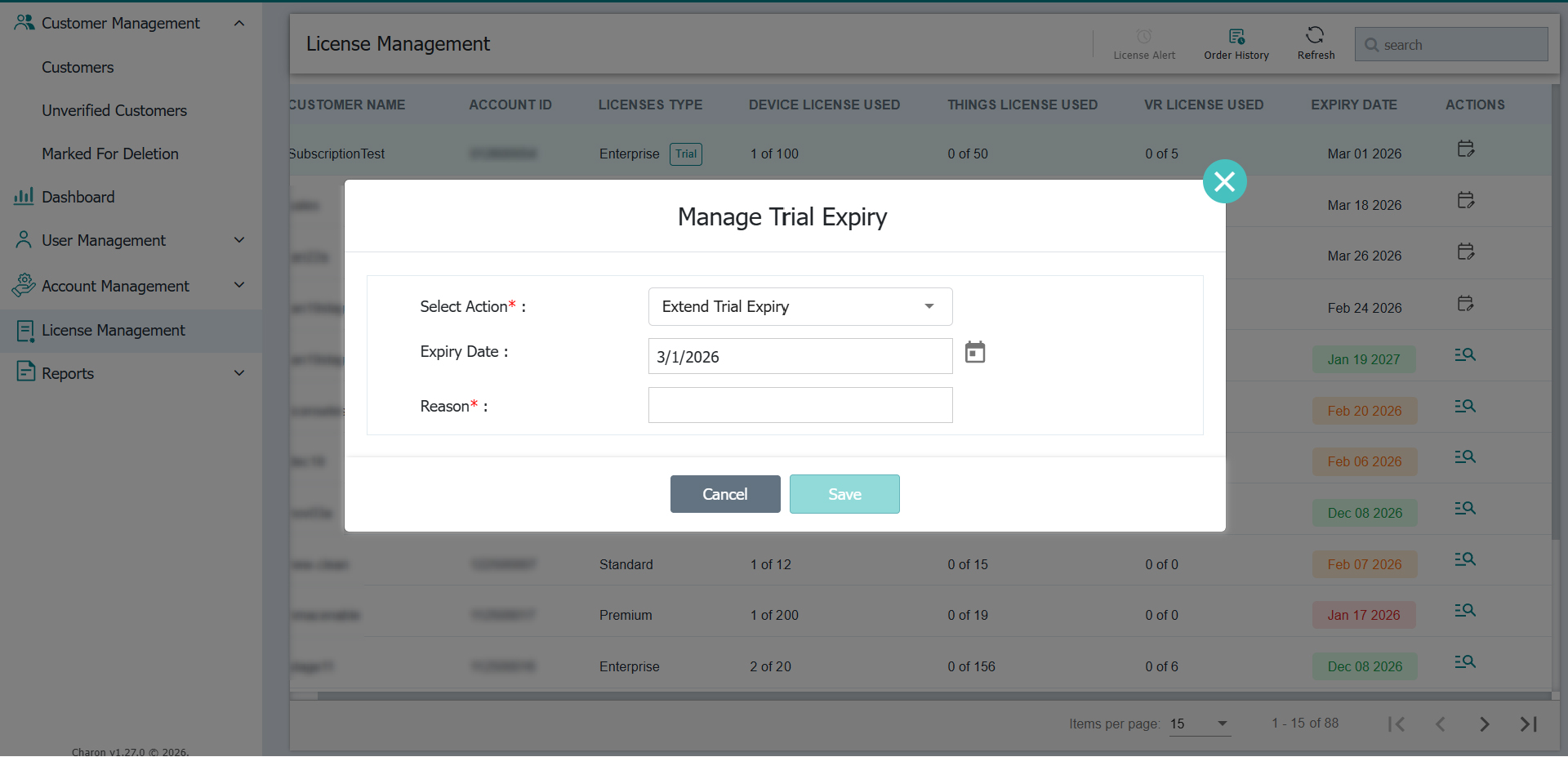
Step 1: Select Action
Choose Extend Trial Expiry from the dropdown menu.
Step 2: Select Expiry Date
Use the date picker to choose the new extended expiry date.
Note: The selected date must be within the 90-day extension limit.
Step 3: Provide a Reason
Enter a justification for extending the trial in the Reason field. This step is mandatory and helps maintain transparency and proper tracking of trial extensions.
This is how it looks on your SureMDM Hub console:
Know more about how to manage Trial Expiry on SureMDM Hub.
Why Controlled Trial Management Matters
Managing trial licenses effectively helps organizations:
- Maintain accurate license allocation
- Prevent misuse of trial resources
- Track trial extensions with proper justification
- Ensure fair evaluation periods for customers
By offering both trial reduction and extension options, SureMDM Hub ensures MSPs have the flexibility they need while maintaining governance and accountability.
Final Thoughts
The Manage Trial Expiry feature simplifies how administrators handle trial licenses in SureMDM Hub. With structured controls for reducing or extending trial validity, organizations can ensure efficient trial management while maintaining transparency and compliance.
This balance between flexibility and control helps businesses manage customer evaluations more effectively while keeping license usage properly regulated.