
What happens when multiple employees need to use the same iPhone throughout the day? How do organizations ensure each user can quickly access only the apps and resources assigned to them without manually reconfiguring the device every time?
In many industries, iPhones are no longer assigned to just one person. Devices are often used across shifts, departments, classrooms, frontline teams, or customer-facing environments. However, managing these scenarios efficiently can become challenging.
Without the right setup, organizations may face:
- Shared credentials create security risks
- Users may access apps and data from previous sessions
- IT teams struggle to track user activity
- Authentication and password issues increase support overhead
- Inconsistent user experience across shifts
That’s where Shared Device Mode for iOS becomes important.
In this blog, we’ll explore what Shared Device Mode for iOS is, how it works, its benefits, and why it is becoming increasingly important for modern businesses.
What Is Shared Device Mode for iOS?
Shared Device Mode for iOS allows multiple users to securely share a corporate device by signing in with their organizational credentials. Once authenticated, users can access only their designated applications and resources. After signing out, the device becomes available for the next authorized user, enabling secure and efficient device sharing
Instead of dedicating one device per employee or user, organizations can securely share devices across:
- Teams
- Shifts
- Departments
- Temporary workers
- Frontline staff
Depending on the deployment setup and management solution, users may:
- Sign in with organizational credentials
- Access approved business applications
- Use role-based resources
- Automatically receive assigned configurations
This helps organizations maximize device utilization while maintaining security and operational efficiency.
Why Businesses Need Shared iPhone Management
Many organizations rely on shared mobile devices for shift-based employees, frontline workers, healthcare staff, retail associates, and temporary teams.
Without iOS Shared Device Mode, businesses often face device shortages, login delays, higher hardware costs, and inconsistent user experiences. Shared Device Mode for iOS helps streamline secure multi-user access on the same device.
Organizations can configure and manage iOS Shared Device Mode centrally using SureMDM.
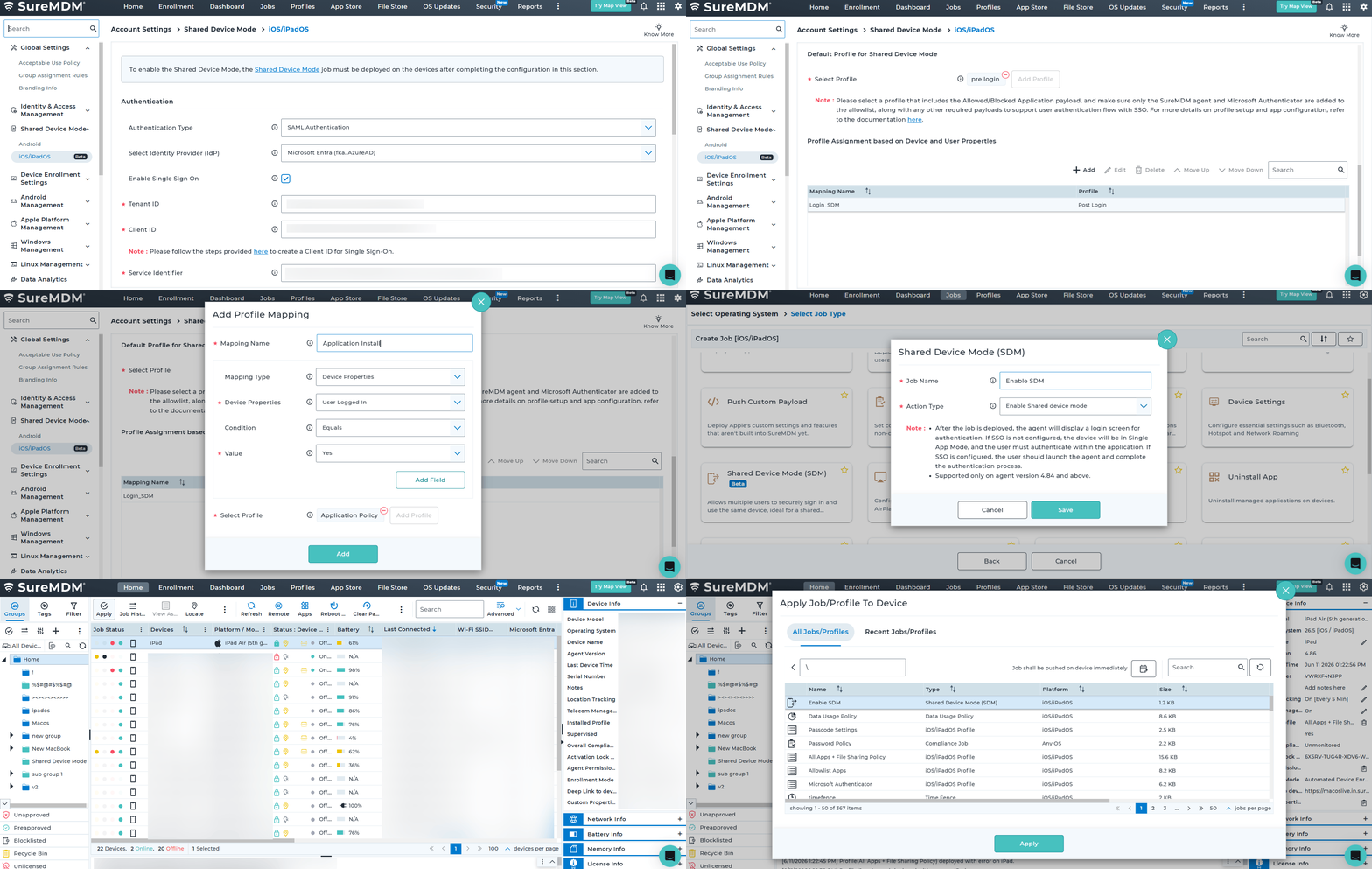
How to Deploy Shared Device Mode on iOS Devices Using SureMDM
- Navigate to SureMDM Web Console > Jobs > New Job > iOS/iPadOS > Shared Device Mode.
- Enter a job name and select the required action:
- Enable Shared Device Mode to allow shared user authentication.
- Disable Shared Device Mode to end active sessions and restore normal device usage.
- If disabling Shared Device Mode, optionally select a profile to apply afterward.
- Save the job.
- Go to the Home tab and select the target iOS/iPadOS device(s) or group(s).
- Click Apply and deploy the Shared Device Mode job to the selected devices.
- Users will be prompted to authenticate based on the configured SSO or SureMDM Agent setup.
Learn more on how to configure iOS Shared Device Mode.
This is how it looks on your SureMDM Console.
Key Benefits of Shared Device Mode for iOS
- Improved Device Utilization
Maximize device usage across multiple employees while reducing hardware costs.
- Faster Employee Access
Allow users to quickly sign in and access required apps and resources.
- Sign-In Across MSAL-Enabled Apps
Users authenticate once through the SureMDM Agent and are automatically signed in to supported MSAL (Microsoft Authentication Library) enabled applications, reducing login friction and improving productivity.
- Simplified IT Management
Centrally manage policies, apps, permissions, and security settings across shared devices.
- Enhanced Security
Eliminate shared credentials by providing user-level accountability and identity-based access control, reducing the risk of unauthorized access.
- Better User Experience
Deliver a consistent and organized experience across shared iOS devices.
Best Practices for Implementing iOS Shared Device Mode
- Use Strong Authentication
Enable MFA, identity provider integration, and secure managed credentials.
- Standardize Application Access
Deploy consistent apps and configurations across shared devices.
- Define Role-Based Policies
Customize access based on departments, job roles, and operational needs.
- Automate Session Cleanup
Remove temporary data and app sessions after logout.
- Monitor Device Compliance
Track device health, OS versions, security posture, and policy compliance regularly.
Final Thoughts
Shared Device Mode for iOS helps organizations securely share devices among multiple users while maintaining user accountability and access control. Combined with SureMDM and Microsoft Entra ID, it delivers a seamless sign-in experience, role-based application access, and centralized device management for shared-use environments.