view
deactivate request for lost/stolen/broken devices (to request for deactivation, product support and maintenance plan has to be active)
alerts
access/Edit
Note: The mentioned steps are for the lost/stolen/broken devices only. For other devices, follow the deactivation process on the device using Deactivate option.
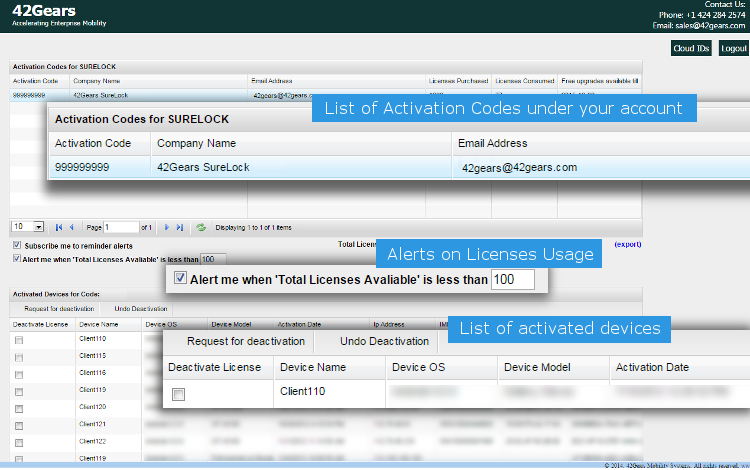
Deactivate a License
To remove/deactivate licenses from a device using License Activation Console
1. Access https://activate.42gears.com/login.aspx
2.
3. Click on Request for deactivation
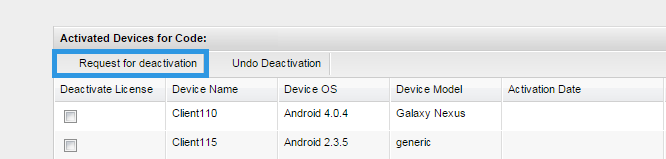
Note: The mentioned steps are for the lost/stolen/broken devices only. For other devices, follow the deactivation process on the device using Deactivate option.
Set Notification/Alerts
1. Access https://activate.42gears.com/login.aspx
2. Enter a value in Alert me when 'Total Licenses Available' is less than
Edit Settings using Cloud ID
License Activation Console also has an option to edit or delete SureLock/SureFox/SureVideo
1. Access https://activate.42gears.com/login.aspx
2. Click on Cloud IDs to go to Cloud ID Management
3. On Cloud ID Management screen, enter a cloud ID and click on Search
4. Next screen, make the necessary changes and click on Save Changes