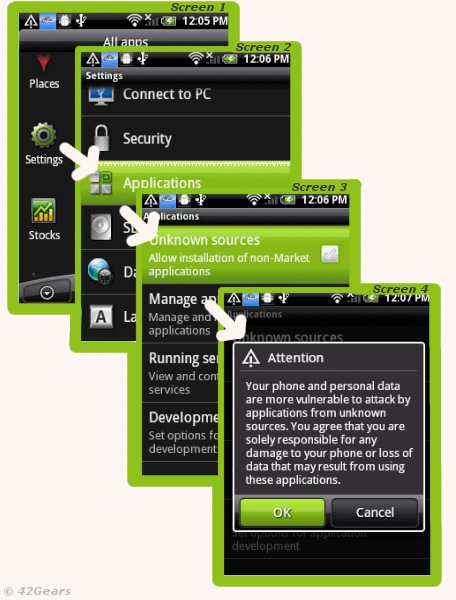
- Go to the 'Settings' page
- Click on 'Applications' tab
- Search the option 'Unknown Sources' allowing you to install non-Market applications and enable the checkbox
- Accept the warning which states the vulnerability of apps from unknown sources (Just make sure you install trusted applications only)
- Finally, all you need to do is just copy the package file (.apk) of the application you want to install to any location of your memory card and launch the setup using a file browser. (File browsers are freely available and are needed to access the files on your device's memory) [caption id="attachment_851" align="aligncenter" width="456" caption="Allowing App installation on Android Device from unknown sources"]
 [/caption]
NOTE: Some Network Carriers might disable the option to allow non-market applications for security reasons. Please consult with your operator in order to get more details regarding the same.
Author: Panshul Srivastava 42Gears Mobility Systems
To learn more on how to secure and manage Android and Windows Mobile/CE devices efficiently, visit us at www.42gears.com