SureMDM provides a very simple solution for this time sync problem. You can apply a TimesyncJob to the devices managed by SureMDM
1. Login to SureMDM Web Console
2. Click on the Jobs on the Utility Panel
3. Click on New->Windows Mobile->Nix Agent Settings->OK
4. You get the following screen on your SureMDM Web Console
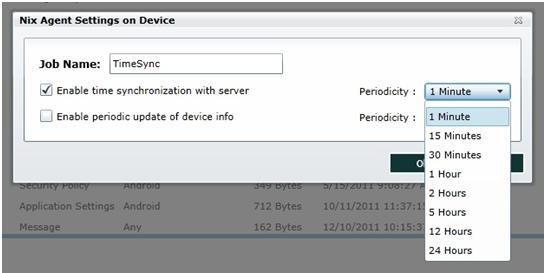
5. Tick the Enable time synchronization with server checkbox and select your preferred Periodicity interval
6. Click OK
7. Now select your device(s) or a Group of devices and click on Apply
8. Select the Timesync Job you just created and click on OK