
SureFox allows you to display local html files in Android devices in kiosk mode. Just follow the steps below to use SureFox in local mode:
1. Copy all the html content (html files, images, flash files, css, etc) into the SDCard on the device
2. Launch SureFox, access SureFox Settings and tap on Allowed Websites
3. Tap on Add URL
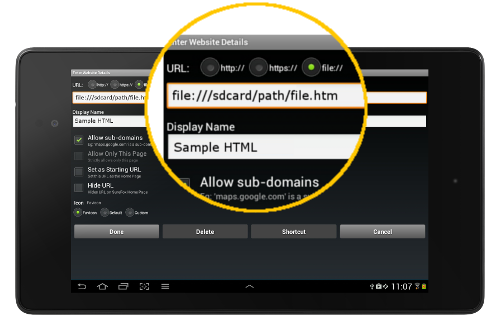
4. On Enter Website Details screen, select file:// option and enter the URL as : “file:///sdcard/path/file.htm”
Note: Path specifies the local folder’s location on your SDCard where the actual file is located.
5. Enter the Display Name and tap OK to save the settings
An example is displayed below:
This method is highly useful for displaying custom web pages in Kiosk Mode without worrying about internet connectivity on the device.
To learn more on how to run your web-applications on Android Tablets & Smartphones in Kiosk mode, visit us at www.42gears.com/surefox